cedvan/pydio
Docker image to launch a pydio application self hosted to create private cloud
2.3K
cedvan/pydio repository overview
Docker Pydio






Complete Solution of sharing and sync for your employees. Open source software deployed on your servers or in your cloud.
Quick start
docker run --name pydio -d \
    -p 80:80 \
    cedvan/pydio:8.0.1-2
- Go with your browser to localhost
- Install pydio with wizard
- Configure database with embedded MySQL server, cf Use MySQL embedded
Configure specific DNS
To use a specfic DNS, configure pydio host.
docker run --name pydio -d \
    -p 80:80 \
    -e "PYDIO_HOST=domain.com" \
    cedvan/pydio:8.0.1-2
Save Pydio data
Pydio files are saved to /data/pydio in container. Just mount this volume for save your configurations and files
docker run --name pydio -d \
    -v /opt/pydio:/data/pydio \
    cedvan/pydio:8.0.1-2
Pydio database
Pydio need a database to works.
Use MySQL embedded
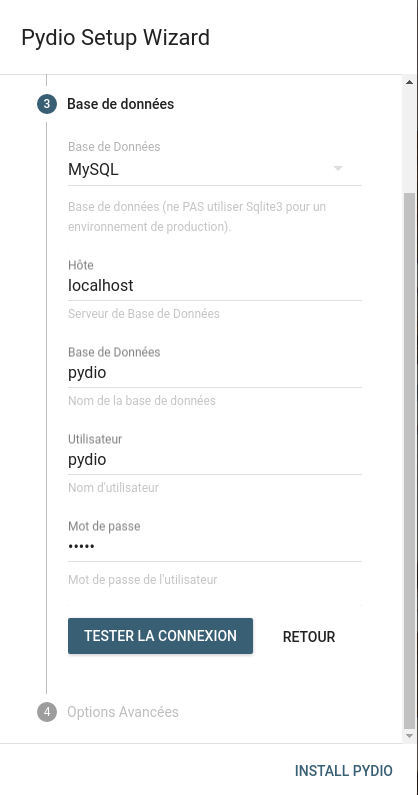
By default with DB_HOST environment variable set to localhost or 127.0.0.1, this container configure and start a embedded MySQL server.
Database default configuration :
- Name:
pydio - User:
pydio - Password:
pydio
You can configure this parameters, cf Pydio Options
Sample :
docker run --name pydio -d \
    -v /opt/pydio-mysql:/var/lib/mysql \
    cedvan/pydio:8.0.1-2
Don't forget mount /var/lib/mysql to save MySQL data
And configure database parameters in Pydio with wizard installation
Use external database
Sample with mysql
docker run --name pydio-mysql -d \
    -v /opt/pydio-mysql:/var/lib/mysql \
    -e "MYSQL_ROOT_PASSWORD=my_pydio_db_root_password" \
    -e "MYSQL_DATABASE=my_pydio" \
    -e "MYSQL_USER=my_pydio_db_user" \
    -e "MYSQL_PASSWORD=my_pydio_db_password" \
    mysql:latest
docker run --name pydio -d \
    --link pydio-mysql:mysql
    -e "DB_HOST=mysql" \
    -e "DB_NAME=my_pydio" \
    -e "DB_USER=my_pydio_db_user" \
    -e "DB_PASSWORD=my_pydio_db_password" \
    cedvan/pydio:8.0.1-2
And configure database parameters in Pydio with wizard installation
Enabled HTTPS
docker run --name pydio -d \
    -p 443:443 \
    -e "PYDIO_HTTPS=true" \
    -e "PYDIO_FORCE_HTTPS=true" \
    -v /opt/pydio/certs:/data/certs \
    cedvan/pydio:8.0.1-2
Add your pydio.key and pydio.crt in folder certs. If pydio.key and pydio.crt do not exist, the container will create self-signed certificates
Load Pydio behind HTTPS Proxy
docker run --name pydio -d \
    -e "PYDIO_HTTPS_PORT=443" \
    -e "PYDIO_HTTPS_REVERSE_PROXY=true" \
    -v /opt/pydio/certs:/data/certs \
    cedvan/pydio:8.0.1-2
Configure your proxy to redirect on container on port 443. No need certificates in container with this configuration
Pydio Options
Please refer the docker run command options for the --env-file flag where you can specify all required environment variables in a single file. This will save you from writing a potentially long docker run command. Alternately you can use fig.
Below is the complete list of available options that can be used to customize your Pydio installation.
- PYDIO_HOST: The hostname of the pydio server. Defaults to
localhost - PYDIO_HTTP_PORT: The port of the pydio http server. Defaults to
80 - PYDIO_HTTPS: Set to
trueto enable https support, Defaults tofalse. If you do not use a reverse proxy, do not forget to add the certificates files - PYDIO_HTTPS_PORT: The port of the pydio https server. Defaults to
443 - PYDIO_HTTPS_REVERSE_PROXY: Set to
trueif you use docker behind a reverse proxy for i.e. ssl termination. This will make pydio use the HTTPS scheme without the need to add certificates. If you do so, make sure to set your reverse proxy to target port 443. Defaults tofalse - PYDIO_FORCE_HTTPS: Set to
trueif you want Pydio automatically redirect to https. Defaults tofalse - PYDIO_LOCALE: Set to configure default locale used by Pydio. Defaults to
en_US - DB_HOST: Set to configure database host. This image provide a embedded mysql, but you can specify external database with this parameter. Defaults to
localhost - DB_PORT: Set to configure database port. Defaults to
3306 - DB_NAME: Set to configure database name. Defaults to
pydio - DB_USER: Set to configure database user. Defaults to
pydio - DB_PASSWORD: Set to configure database password. Defaults to
pydio - PHP_TIMEZONE: Configure timezone PHP. Default
Europe/Paris.
Pdyio License
Pydio is open source and free to the communauty. You can add a license to activate enterprise edition, cf https://pydio.com/en/pricing
Contributing
See CONTRIBUTING file.
References
Pydio is built by Abstrium
Tag summary
Content type
Image
Digest
Size
437.8 MB
Last updated
almost 9 years ago
docker pull cedvan/pydio