couchbase/enterprise-analytics repository overview
Introduction to Enterprise Analytics
Enterprise Analytics is a self-managed, JSON-native NoSQL analytical database. It serves to unify data from diverse sources, allowing for the execution of complex analytical queries and the extraction of timely insights.
Enterprise Analytics harnesses the power of NoSQL for analytics. It integrates seamlessly with both Couchbase Server and the Couchbase Capella cloud platform, enabling the creation of real-time, adaptive applications.
Traditionally, analyzing JSON data in NoSQL databases requires complex transformations, like flattening, to prepare it for analytics, causing delays and hindering real-time insights. Enterprise Analytics eliminates these ETL complexities by using a unifying JSON data model with schema flexibility. This allows data to fluidly evolve at its source without requiring manual schema or transformation management. This facilitates a Zero ETL environment, leading to faster time to insight, reduced costs, and increased agility.
Features
- A column-oriented, Log-Structured Merge (LSM) tree–based storage engine delivers scalable analytic performance and capacity for customers with self-managed on-premises or cloud deployments. The LSM tree architecture provides high write throughput for fast data ingestion, while columnar storage accelerates analytical queries by accessing only the necessary columns.
- A shared-nothing compute and shared-object storage architecture that allows customers to scale compute resources independently of storage.
- An enhanced MPP-based query engine enables scalable, real-time analytical query computation.
- A cost-based optimizer improves query execution without requiring user intervention. Using a sample-based approach, it quickly estimates data statistics from a small subset of the data, enabling it to identify the lowest-cost query plan without scanning the entire dataset.
- Zero ETL for incoming data, with real-time ingestion capabilities powered by Confluent Kafka, that provide the ability to connect, capture, and extract data from nearly any database or application. One can optionally modify the target JSON structure of the incoming data while in transit, for example, to omit or modify its fields.
- Data Lakehouse capabilities that enable direct querying from Amazon S3 and S3-compatible storage, with support for formats including JSON, Parquet, Avro, CSV, TSV, and Delta tables, providing the ability for queries to combine external data with other data in Enterprise Analytics.
- A SQL++ based path for writing the results of a query back to the Couchbase Operational data service to support adaptive applications.
- A tabular view facility that provides native SQL-based support for Tableau, PowerBI and Apache Superset for building business reports, visualizations, and dashboards.
This Docker image is designed to make it easy to run Enterprise Analytics for development, testing, and proof-of-concept environments.
Quickstart with Enterprise Analytics and Docker
To quickly get started with Enterprise Analytics, you can run an instance using Docker. This is ideal for development and testing purposes.
Prerequisites
These instructions assume the following:
- Docker installed and running
- No services running on ports
8091or8095 - No existing containers named
ea(ors3mockif using S3Mock)
1. Create a Docker network
Create a user-defined network so the container can communicate with other services if needed.
docker network create ea-net
2. Configure S3Mock (optional)
If you want to use S3Mock as the blob storage backend, you can start the S3Mock container first. Otherwise, you need to configure Enterprise Analytics to use a different blob storage backend.
docker run -d --name s3mock --network ea-net -e initialBuckets=ea-storage adobe/s3mock
3. Start the Enterprise Analytics container
Run the Enterprise Analytics container with host and port mappings for the Couchbase Web Console and Enterprise Analytics service, exposed on ports 8091 and 8095 on the host.
docker run -d --name ea --network ea-net -p 8091:8091 -p 8095:8095 couchbase/enterprise-analytics:2.0.0
4. Initialize the cluster
Next, visit http://localhost:8091 on the host machine to see the Web Console to start Enterprise Analytics setup.
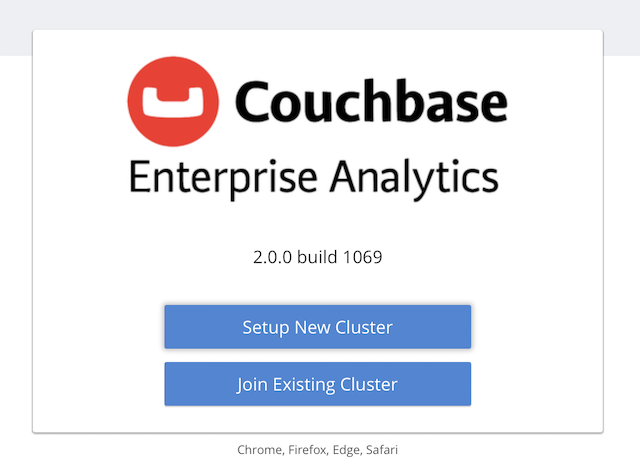
Walk through the Setup wizard
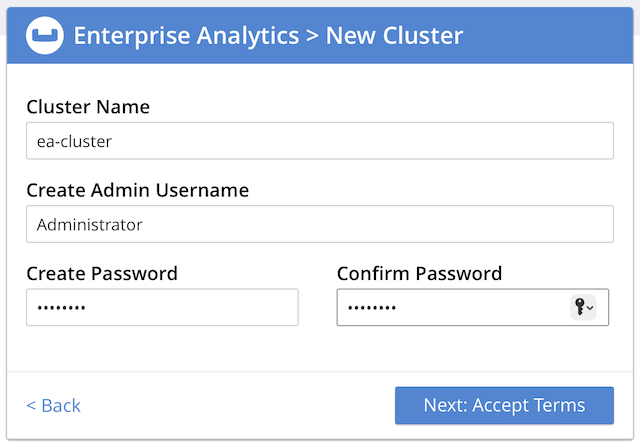
If using S3Mock, you can configure the blob storage settings to point to the S3Mock endpoint:
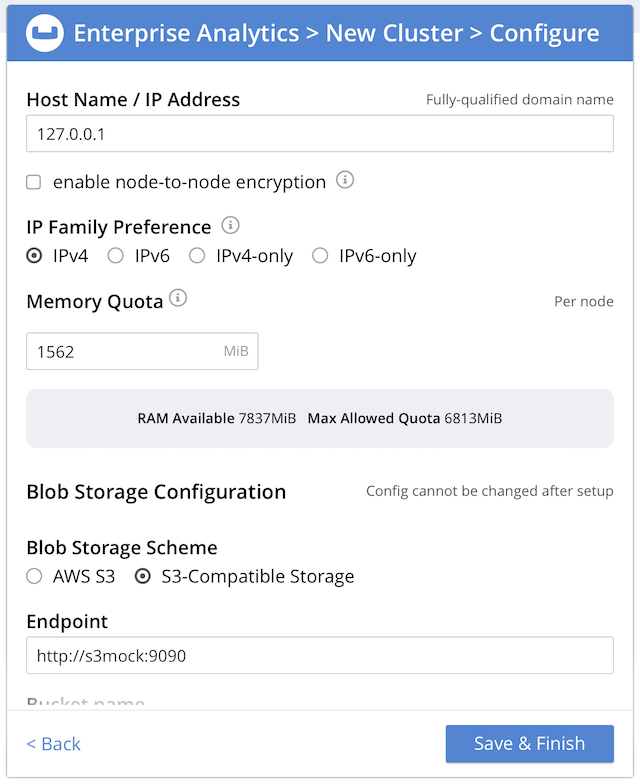
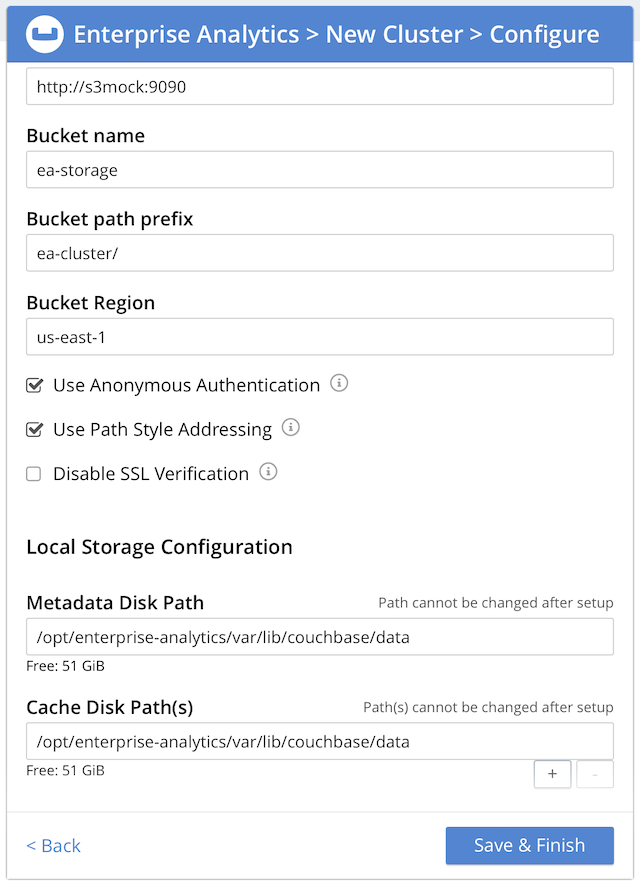
Otherwise, configure the blob storage settings to point to your chosen backend (e.g. AWS S3 or another S3-compatible service/appliance).
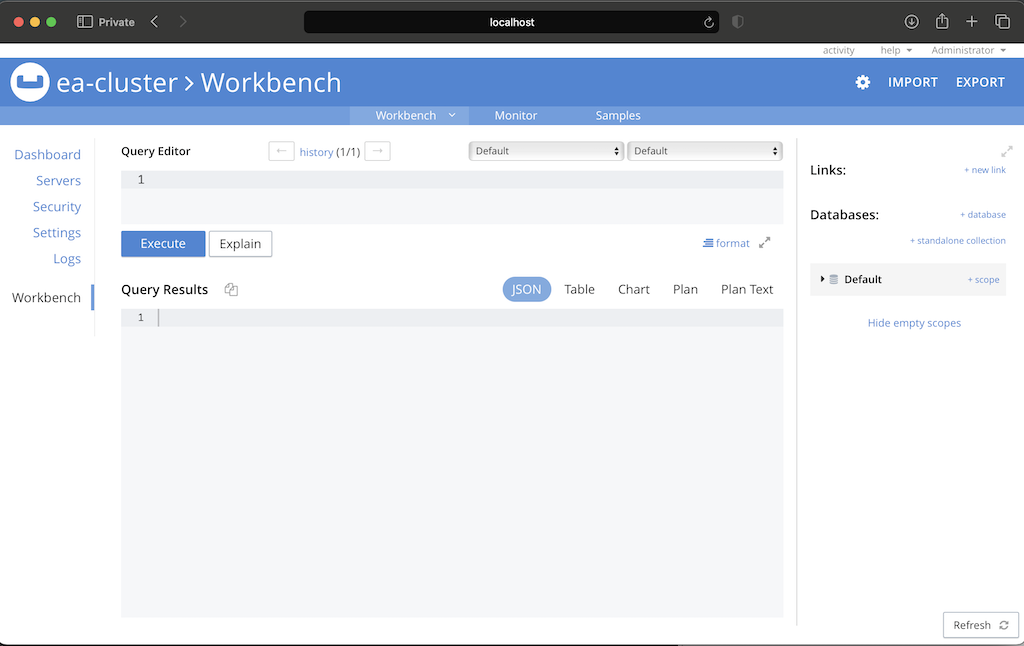
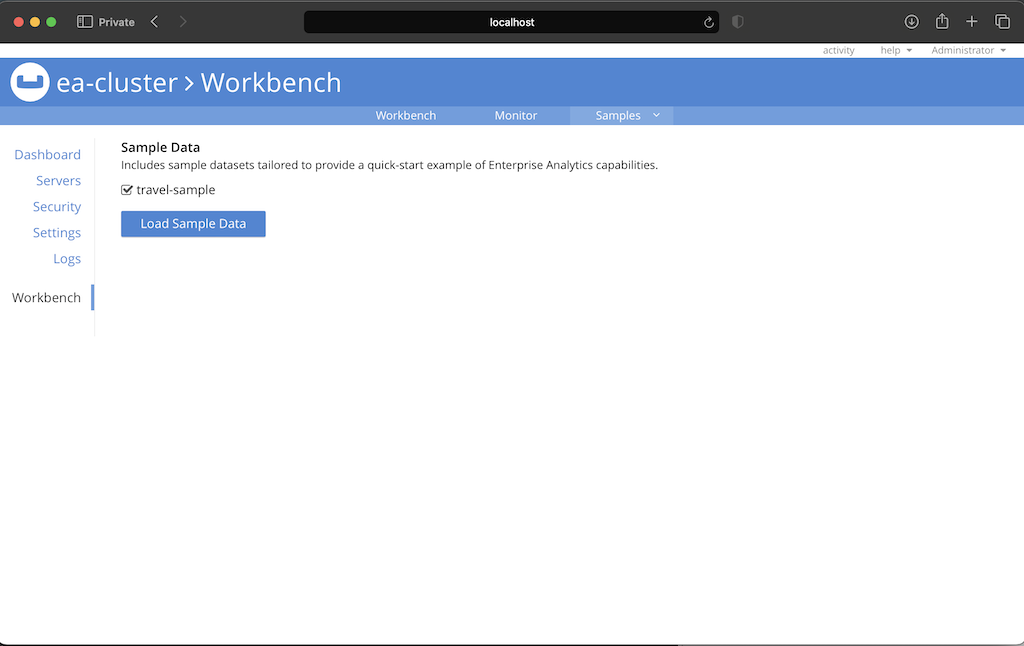
5. Install travel-sample dataset
After completing the setup, the console will load.
6. Execute a sample query
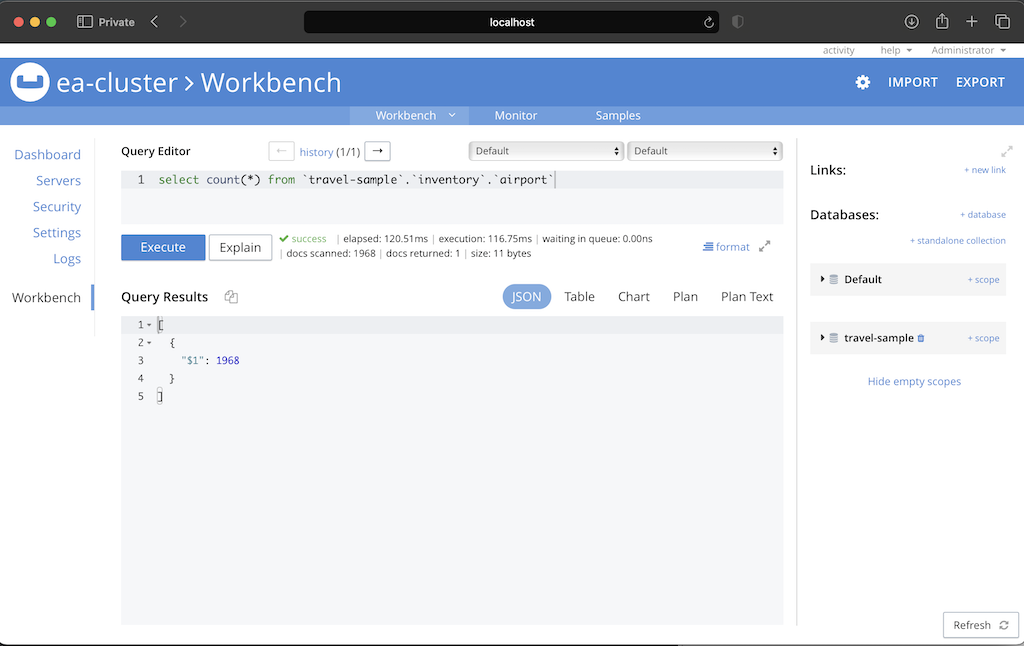
You can now run a sample query to verify that everything is working correctly. For example, you can run the following SQL++ query to get a count of airports in the travel-sample.
7. Next steps
You can now explore the features of Enterprise Analytics, such as creating views, running more complex queries, and integrating with other data sources.
See the Enterprise Analytics documentation for more information.
Alternatively, you can follow the instructions below to set up a multi-node cluster using S3Mock as the blob storage backend.
Running a Two-Node Enterprise Analytics Cluster with S3Mock
The following example shows how to start a two-node Enterprise Analytics cluster, using Adobe S3Mock as the blob storage backend.
Prerequisites
These instructions assume the following:
- Docker installed and running
- No existing containers named
s3mock,ea1, orea2 - No services running on ports
8091,8095,9091, or9095
1. Create a Docker network
Create a user-defined network so the containers can talk to each other by name.
docker network create ea-net
2. Start the Adobe S3Mock service
Start the S3Mock container with an initial bucket called ea-storage.
docker run -d --name s3mock --network ea-net -e initialBuckets=ea-storage adobe/s3mock
3. Start the first Enterprise Analytics node
Run the first node (ea1) with host and port mappings for the Couchbase Web Console and Analytics service.
docker run -d --name ea1 --network ea-net --hostname ea1.example.com --network-alias ea1.example.com \
       -p 8091:8091 -p 8095:8095 couchbase/enterprise-analytics:2.0.0
4. Start the second Enterprise Analytics node
Run the second node (ea2) with its own mapped ports so you can access it separately from ea1.
docker run -d --name ea2 --network ea-net --hostname ea2.example.com --network-alias ea2.example.com \
       -p 9091:8091 -p 9095:8095 couchbase/enterprise-analytics:2.0.0
5. Wait for the nodes to be ready
Before proceeding, ensure the nodes are fully booted and ready for configuration. You can check the status of each node by querying the /pools/default API. The API should return a 404 status with the text 'unknown pool' when the server is ready to accept configuration.
e.g.
$ curl http://localhost:8091/pools/default
"unknown pool"
6. Initialize the nodes
Initialize ea1 and ea2 nodes with hostnames and admin credentials.
docker exec ea1 couchbase-cli node-init \
  --cluster http://localhost:8091 \
  --username Administrator \
  --password password \
  --node-init-hostname ea1.example.com

docker exec ea2 couchbase-cli node-init \
  --cluster http://localhost:8091 \
  --username Administrator \
  --password password \
  --node-init-hostname ea2.example.com
7. Configure blob storage to use S3Mock
- Configure Enterprise Analytics to use the S3Mock endpoint
docker exec ea1 couchbase-cli setting-enterprise-analytics --cluster http://localhost:8091 \
  --username Administrator --password password \
  --set \
  --scheme s3 \
  --bucket ea-storage \
  --region us-east-1 \
  --endpoint http://s3mock:9090 \
  --anonymous-auth 1 \
  --path-style-addressing 1
8. Initialize the cluster
Initialize the Enterprise Analytics cluster.
docker exec ea1 couchbase-cli cluster-init \
  --cluster http://localhost:8091 \
  --cluster-username Administrator \
  --cluster-password password
9. Add the second node (ea2) to the cluster (ea1)
Add ea2 to the cluster, and perform a rebalance.
docker exec ea1 couchbase-cli server-add \
  --cluster http://localhost:8091 \
  --username Administrator \
  --password password \
  --server-add ea2.example.com \
  --server-add-username Administrator \
  --server-add-password password

docker exec ea1 couchbase-cli rebalance \
  --cluster http://localhost:8091 \
  --username Administrator \
  --password password
10. Access the Web Console
Once rebalanced, the cluster is ready to be used. Access the UI at:
- ea1: http://localhost:8091
- ea2: http://localhost:9091
Ports
| Port | Description |
|---|---|
| 8091 | Web console / REST API (HTTP) |
| 8095 | Analytics HTTP API |
| 18091 | Web console / REST API (HTTPS) |
| 18095 | Analytics HTTPS API |
Volumes
Data in Enterprise Analytics is stored under /opt/enterprise-analytics/var/lib/couchbase/data. For persistent deployments, mount a Docker volume or host directory to this path.
Example:
docker run -d --name ea1 -v ea1-data:/opt/enterprise-analytics/var/lib/couchbase/data couchbase/enterprise-analytics:2.0.0
License
Enterprise Analytics is licensed under the Couchbase Enterprise License Agreement.
Tag summary
Content type
Image
Digest
sha256:8b6bbd6ae…
Size
822.1 MB
Last updated
4 days ago
docker pull couchbase/enterprise-analytics