cplieger/web-terminal-kiro
Web Terminal for Kiro: run kiro-cli in a browser tab, on desktop or phone
10K+
cplieger/web-terminal-kiro repository overview
web-terminal-kiro
A minimal browser terminal for the Kiro CLI: run kiro-cli in a browser tab, on your desktop or your phone.
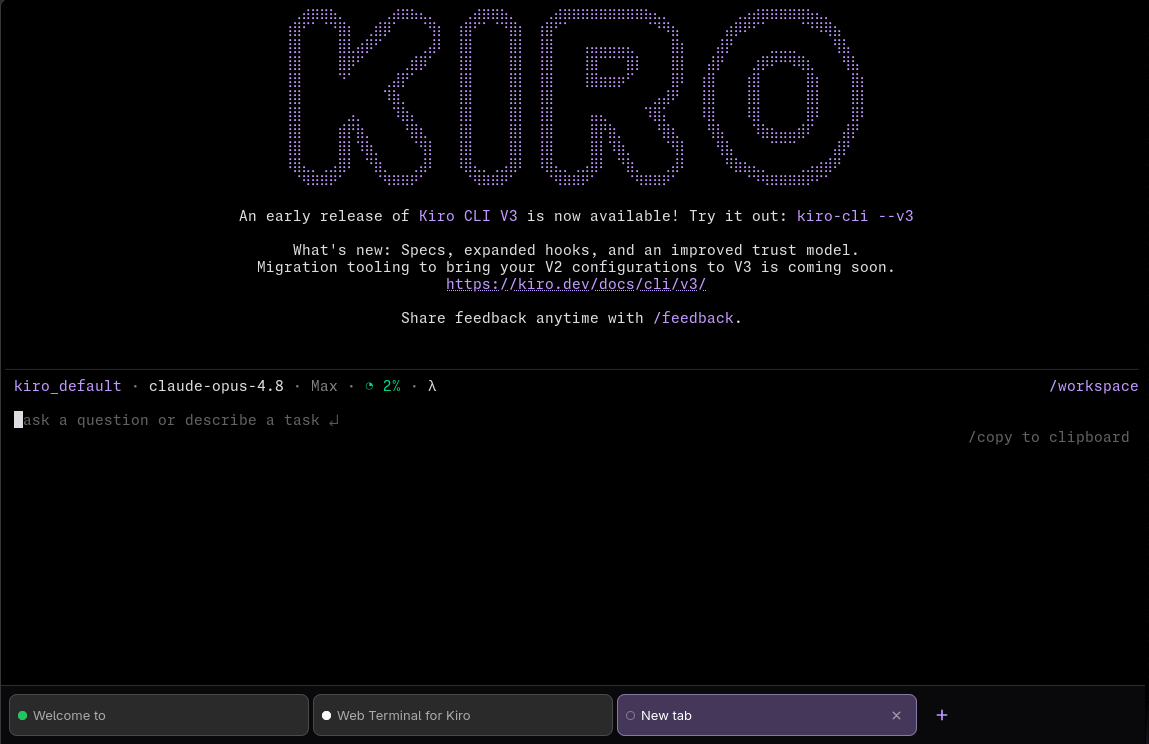
Web Terminal for Kiro gives each browser tab its own kiro-cli session over a live PTY stream and renders kiro-cli's real terminal UI verbatim, the way an SSH session would, with no chat layer, history store, or translation in between.
It differs from a typical browser terminal in three ways. The screen is real browser text, so scrolling and text selection are native. It is touch-first with multiple tabs, as usable on a phone as on a laptop. Sessions survive sleep and network drops: the screen and scrollback are replayed on reconnect.
Published as a multi-arch (amd64 + arm64) container image on GHCR (ghcr.io/cplieger/web-terminal-kiro) and Docker Hub (cplieger/web-terminal-kiro).
⚠️ It is a remote shell
A browser tab here is an interactive shell with access to your files under /workspace and to kiro-cli's stored credentials. Anyone who can reach the port can use it, and Web Terminal for Kiro has no built-in authentication. Before exposing it beyond your own machine, do one (ideally both) of:
- put it behind an authenticating reverse proxy (Caddy forward-auth, oauth2-proxy, Authentik, …), and/or
- keep the published port on loopback or a private network.
Neither of those covers DNS rebinding: a malicious page in your own browser can point its own hostname at 127.0.0.1 (or your LAN IP) and drive even a loopback-bound terminal, because the request then arrives from your own machine with a matching Origin. Also set ALLOWED_HOSTS to the exact hostnames you reach it by; the Host allowlist is the check that rejects a rebound request.
The server logs a warning at startup when it binds a non-loopback address, and another when ALLOWED_HOSTS is unset.
Stored scrollback
Each tab's newest 200 lines are kept in your browser's localStorage, so returning to a page your phone discarded does not pull every tab's history back over the wire. Terminal output is not always something you want on disk, so know what that keeps:
- It is readable from that browser without reaching this server, and it outlives the tab. An entry is deleted when you close its terminal, and otherwise after seven days.
- Nothing is sent anywhere. The server neither receives nor reads these snapshots.
- Restored output is cleared when it came from a previous run of the container, so a restart never leaves last run's history on screen.
- On a shared or borrowed device, use a private window, which keeps no storage at all.
No setting turns this off.
Pull
docker pull cplieger/web-terminal-kiro:latest
Also published to ghcr.io/cplieger/web-terminal-kiro with identical images and tags. Release versions are tagged vX.Y.Z alongside latest.
Quick start
# Example compose for web-terminal-kiro. See the README for all configuration options and hardening.
services:
  web-terminal-kiro:
    image: ghcr.io/cplieger/web-terminal-kiro:latest
    container_name: web-terminal-kiro
    restart: unless-stopped
    # Required, not optional: tini reaps orphaned children. An agent session forks language servers,
    # gits and node runtimes whose own parent exits, re-parenting them onto PID 1, and the server
    # waits only for the children it spawned itself; at PID 1 it collects them as zombies instead.
    init: true

    ports:
      # Root shell with no built-in auth; loopback alone does not stop DNS rebinding.
      # See README "It is a remote shell" for proxy, bind, and ALLOWED_HOSTS setup.
      - "9848:9848"

    volumes:
      - "/opt/appdata/web-terminal-kiro/config:/config"
      - "/opt/appdata/web-terminal-kiro/workspace:/workspace"
Documentation
- Full documentation — configuration, behavior, security
- Contributing
- Releases and changelog
License
MPL-2.0. See LICENSE.
The image carries the license text of every bundled component under
/usr/share/licenses/.
The image redistributes two web fonts under their own licences, each served
beside the font it covers. Monaspace Neon NF is under the SIL Open Font License
1.1 (/vendor/fonts/MonaspaceNeonNF-LICENSE). Web Terminal Glyphs, the tiling
overlay listed ahead of it, is under Apache-2.0
(/vendor/fonts/WebTerminalGlyphs-LICENSE, with its
/vendor/fonts/WebTerminalGlyphs-NOTICE).
Tag summary
Content type
Image
Digest
sha256:221a109cd…
Size
77.4 MB
Last updated
4 minutes ago
docker pull cplieger/web-terminal-kiro