ddosify/ddosify-docker-extension
Ddosify, High-performance, open-source and simple load testing docker extension, written in Golang.
50K+
ddosify/ddosify-docker-extension repository overview
Ddosify Docker Extension
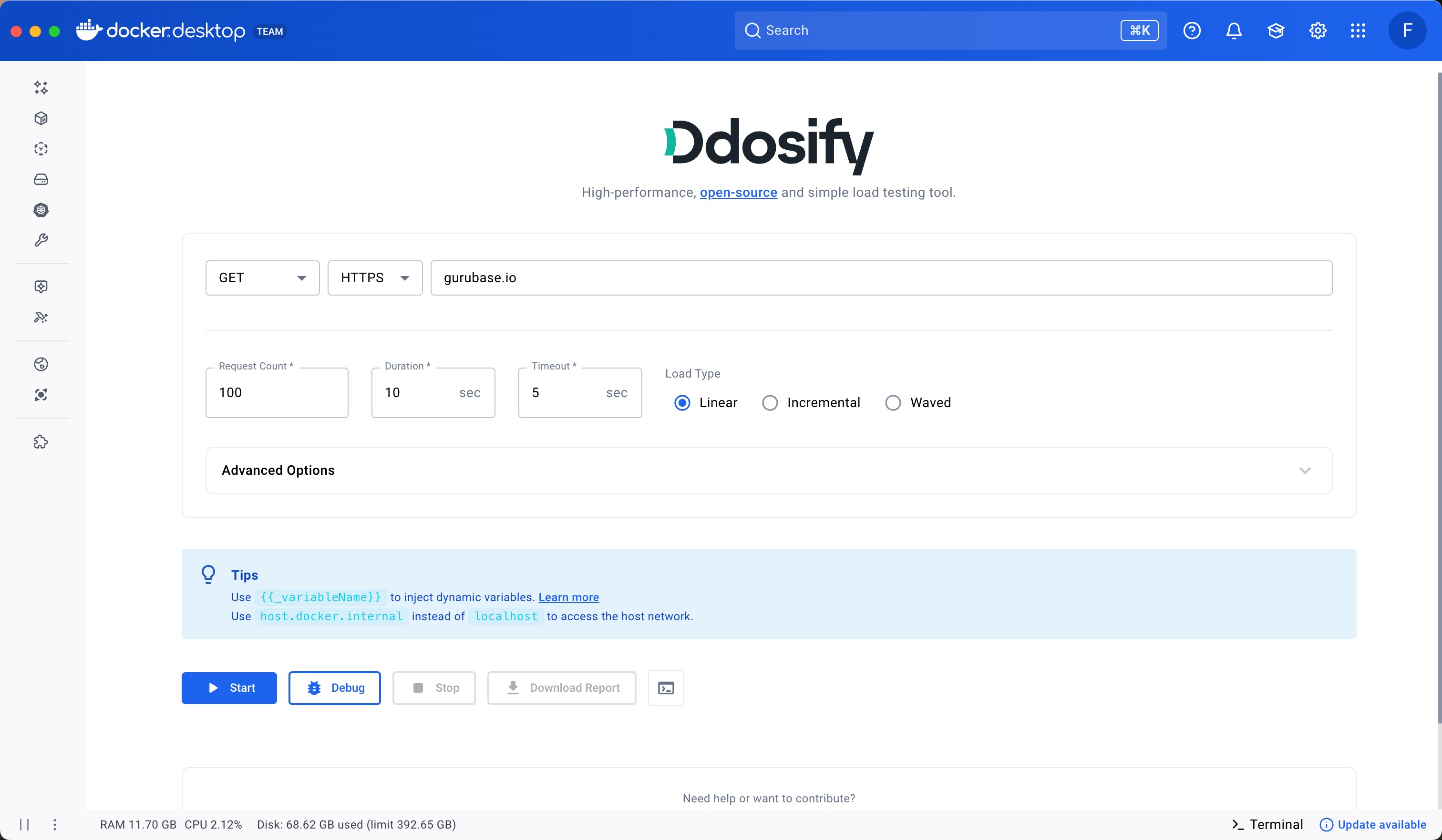
High-performance load testing tool for Docker Desktop






Features
| Feature | Description |
|---|---|
| Open Source Engine | Powered by Ddosify - a high-performance load testing tool written in Go |
| Protocol Support | HTTP and HTTPS with more protocols coming soon |
| Load Types | Linear, incremental, and waved load patterns to test different scenarios |
| Rich Results | Visual charts for duration breakdown, status code distribution, and test progress |
| Debug Mode | Single request with verbose output for troubleshooting |
| Dynamic Variables | Parameterization support with variables like {{_randomInt}}, {{_randomString}} |
| CLI Command Export | Copy the equivalent Docker CLI command to run tests outside the extension |
| PDF Reports | Download detailed test reports in PDF format |
| Lightweight | Extension size under 10MB |
Installation
Docker Extensions Marketplace (Recommended)
- Open Docker Desktop (version 4.10 or higher required)
- Navigate to the Extensions tab
- Click Add Extensions
- Search for Ddosify and click Install
Note: If you don't see the Extensions tab, go to Settings > Extensions and enable "Docker Extensions".
Terminal
# Install from Docker Hub
docker extension install ddosify/ddosify-docker-extension:latest

# Or build and install locally
docker build --tag=ddosify/ddosify-docker-extension:latest .
docker extension install ddosify/ddosify-docker-extension:latest
Usage
Basic Load Test
- Enter your target URL (e.g.,
httpbingo.org/get) - Select the protocol (HTTP/HTTPS) and HTTP method
- Configure load parameters:
- Request Count: Total number of requests
- Duration: Test duration in seconds
- Load Type: Linear, Incremental, or Waved
- Click Start to run the test
Debug Mode
Click Debug to send a single request with verbose output - useful for verifying your configuration before running a full load test.
CLI Command Export
Click the terminal icon to view and copy the equivalent Docker CLI command:
docker run -it --rm ddosify/ddosify ddosify -t "https://httpbingo.org/get" -n 100 -d 10 -m GET -l linear -T 5
Advanced Options
- Headers: Add custom HTTP headers
- Request Body: Send JSON or other data with POST/PUT requests
- Basic Auth: Add authentication credentials
- Proxy: Route requests through a proxy server
- Timeout: Set request timeout in seconds
Dynamic Variables
Use dynamic variables in your URL, headers, or body:
| Variable | Description | Example |
|---|---|---|
{{_randomInt}} | Random integer | 12345 |
{{_randomString}} | Random string | abc123 |
{{_uuid}} | UUID v4 | 550e8400-e29b-41d4-a716-446655440000 |
{{_timestamp}} | Unix timestamp | 1699876543 |
Example: https://api.example.com/users/{{_randomInt}}
See Ddosify documentation for the full list of dynamic variables.
Tips
- Use
host.docker.internalinstead oflocalhostto test services running on your host machine - Start with Debug mode to verify your configuration
- Use the PDF report feature to save and share test results
Development
Setup
cd ui
npm install
npm run dev
Debug with Hot Reload
docker extension dev debug ddosify/ddosify-docker-extension
docker extension dev ui-source ddosify/ddosify-docker-extension http://localhost:3000
Build
npm run build
docker build --tag=ddosify/ddosify-docker-extension:dev .
docker extension install ddosify/ddosify-docker-extension:dev
Reset Configuration
docker extension dev reset ddosify/ddosify-docker-extension
Uninstall
docker extension rm ddosify/ddosify-docker-extension:latest
Publishing to Marketplace
To publish a new version to the Docker Extensions Marketplace:
1. Update Version
Update the TAG in the Makefile:
TAG?=0.3.0
2. Build and Push Multi-arch Image
make push-extension
This builds and pushes images for both linux/amd64 and linux/arm64 platforms.
4. Automatic Publishing
Extensions now go through an automated validation process. If all checks pass, the extension is published within a few hours. No manual review is required.
Notes
- The marketplace caches extensions for 12 hours. Restart Docker Desktop to force refresh.
- Only extensions listed in the marketplace can be installed by default (changeable in Docker Desktop settings).
- Extension updates are automatically downloaded and installed for users.
For more details, see the Docker Extensions Publishing Guide.
Community
- Join our Discord Server for support, feature requests, and discussions
- Star the Ddosify repository on GitHub
- Report issues on GitHub Issues
More
This extension uses the single-node version of Ddosify. For distributed, no-code, and geo-targeted load testing, check out Ddosify Cloud.
Disclaimer
Ddosify is created for testing the performance of web applications. Users must be the owner of the target system. Using it for harmful purposes is strictly prohibited. The Ddosify team & company is not responsible for misuse or its consequences.
Note
Ddosify has been renamed to Anteon. The load testing engine remains open source and continues to be maintained.
License
Licensed under the AGPLv3
Tag summary
Content type
Image
Digest
sha256:18016062c…
Size
7.5 MB
Last updated
8 months ago
docker pull ddosify/ddosify-docker-extension:0.3.0This week's pulls
Pulls:
79
Last week