hugegraph/rag
HugeGraph Agentic GraphRAG
10K+
hugegraph/rag repository overview
hugegraph-ai


hugegraph-ai integrates HugeGraph with artificial intelligence capabilities, providing comprehensive support for developers to build AI-powered graph applications.
✨ Key Features
- LLM/GraphRAG: Build intelligent question-answering systems with graph-enhanced retrieval
- Knowledge Graph Construction: Automated graph building from text using LLMs
- Graph ML: Integration with 20+ graph learning algorithms (GCN, GAT, GraphSAGE, etc.)
- HG-Python Client: Easy-to-use Python interface for HugeGraph operations
- Vermeer Python Client: SDK/Interface for Graph Computing with Vermeer
🚀 Quick Start
Note
For a complete deployment guide and detailed examples, please refer to [hugegraph-llm/README.md](./hugegraph-llm/README.md)
Prerequisites
- Python 3.10+ (required for hugegraph-llm)
- uv 0.7+ (required for workspace management)
- HugeGraph Server 1.3+ (1.5+ recommended)
- Docker (optional, for containerized deployment)
Option 1: Docker Deployment (Recommended)
# Clone the repository
git clone https://github.com/apache/incubator-hugegraph-ai.git
cd incubator-hugegraph-ai

# Set up environment and start services
cp docker/env.template docker/.env
# Edit docker/.env to set your PROJECT_PATH
cd docker
# same as `docker-compose` (Legacy)
docker compose -f docker-compose-network.yml up -d

# Access services:
# - HugeGraph Server: http://localhost:8080
# - RAG Service: http://localhost:8001
Option 2: Source Installation
# 1. Start HugeGraph Server
docker run -itd --name=server -p 8080:8080 hugegraph/hugegraph

# 2. Clone and set up the project
git clone https://github.com/apache/incubator-hugegraph-ai.git
cd incubator-hugegraph-ai

# 3. Install dependencies with workspace management
# uv sync automatically creates venv (.venv) and installs base dependencies
# NOTE: If download is slow, uncomment mirror lines in pyproject.toml or use: uv config --global index.url https://pypi.tuna.tsinghua.edu.cn/simple
# Or create local uv.toml with mirror settings to avoid git diff (see uv.toml example in root)
uv sync --extra llm  # Install LLM-specific dependencies
# Or install all optional dependencies: uv sync --all-extras

# 4. Activate virtual environment (recommended for easier commands)
source .venv/bin/activate

# 5. Start the demo (no uv run prefix needed when venv activated)
cd hugegraph-llm
python -m hugegraph_llm.demo.rag_demo.app
# Visit http://127.0.0.1:8001
Basic Usage Examples
Note
Examples assume you've activated the virtual environment with `source .venv/bin/activate`
Graph Machine Learning
# Install ML dependencies (ml module is not in workspace)
uv sync --extra ml
source .venv/bin/activate

# Run ML algorithms
cd hugegraph-ml
python examples/your_ml_example.py
📦 Modules
hugegraph-llm
Large language model integration for graph applications:
- GraphRAG: Retrieval-augmented generation with graph data
- Knowledge Graph Construction: Build KGs from text automatically
- Natural Language Interface: Query graphs using natural language
- AI Agents: Intelligent graph analysis and reasoning
hugegraph-ml
Graph machine learning with 20+ implemented algorithms:
- Node Classification: GCN, GAT, GraphSAGE, APPNP, etc.
- Graph Classification: DiffPool, P-GNN, etc.
- Graph Embedding: DeepWalk, Node2Vec, GRACE, etc.
- Link Prediction: SEAL, GATNE, etc.
Note
hugegraph-ml is not part of the workspace but linked via path dependency
hugegraph-python-client
Python client for HugeGraph operations:
- Schema Management: Define vertex/edge labels and properties
- CRUD Operations: Create, read, update, delete graph data
- Gremlin Queries: Execute graph traversal queries
- REST API: Complete HugeGraph REST API coverage
📚 Learn More
🔗 Related HugeGraph Projects
And here are links of other repositories:
- hugegraph (graph's core component - Graph server + PD + Store)
- hugegraph-toolchain (graph tools loader/dashboard/tool/client)
- hugegraph-computer (integrated graph computing system)
- hugegraph-website (doc & website code)
🤝 Contributing
We welcome contributions! Please see our contribution guidelines for details.
🤖 AI Coding Guidelines for Developers
Important
> **For project contributors using AI coding tools**, please follow these guidelines:
- Start Here: First read
rules/README.mdfor the complete AI-assisted development workflow- Module Context: When
AGENTS.mdexists in any module, rename it as context for your LLM (e.g.,CLAUDE.md,copilot-instructions.md)- Documentation Standards: Follow the structured documentation approach in
rules/prompts/project-general.md- Deep Analysis: For complex features, refer to
rules/prompts/project-deep.mdfor comprehensive code analysis methodology- Code Quality: Maintain consistency with existing patterns and ensure proper type annotations
- Testing: Follow TDD principles and ensure comprehensive test coverage for new features
These guidelines ensure consistent code quality and maintainable development workflow with AI assistance.
Development Setup:
# 1. Clone and navigate to project
git clone https://github.com/apache/incubator-hugegraph-ai.git
cd incubator-hugegraph-ai

# 2. Install all development dependencies
# uv sync creates venv automatically and installs base dependencies
uv sync --all-extras  # Install all optional dependency groups
source .venv/bin/activate  # Activate for easier command usage

# 3. Run tests for workspace members
cd hugegraph-llm && pytest
cd ../hugegraph-python-client && pytest

# 4. Run tests for path dependencies
cd ../hugegraph-ml && pytest  # If tests exist

# 5. Format and lint code
./style/code_format_and_analysis.sh

# 6. Add new dependencies to workspace
uv add numpy  # Add to base dependencies
uv add --group dev pytest-mock  # Add to dev group
Code Quality (ruff + pre-commit)
- Ruff is used for linting and formatting:
- `ruff format .`
- `ruff check .`
- Enable Git hooks via pre-commit:
- `pre-commit install`
- `pre-commit run --all-files`
- Config: .pre-commit-config.yaml. CI enforces these checks. Key Points:
- Config: .pre-commit-config.yaml. CI enforces these checks.
Key Points:
- Use GitHub Desktop for easier PR management
- Check existing issues before reporting bugs
📄 License
hugegraph-ai is licensed under Apache 2.0 License.
📞 Contact Us
- GitHub Issues: Report bugs or request features (fastest response)
- Email: [email protected] (subscription required)
- Slack: Join the ASF HugeGraph channel
- WeChat: Follow "Apache HugeGraph" official account
 # HugeGraph-LLM
Bridge the gap between Graph Databases and Large Language Models
🎯 Overview
HugeGraph-LLM is a comprehensive toolkit that combines the power of graph databases with large language models. It enables seamless integration between HugeGraph and LLMs for building intelligent applications.
Key Features
- 🏗️ Knowledge Graph Construction - Build KGs automatically using LLMs + HugeGraph
- 🗣️ Natural Language Querying - Operate graph databases using natural language (Gremlin/Cypher)
- 🔍 Graph-Enhanced RAG - Leverage knowledge graphs to improve answer accuracy (GraphRAG & Graph Agent)
For detailed source code doc, visit our DeepWiki page. (Recommended)
📋 Prerequisites
Important
- Python: 3.10+ (not tested on 3.12)
- HugeGraph Server: 1.3+ (recommended: 1.5+)
- UV Package Manager: 0.7+
Code Quality (ruff + pre-commit)
- Ruff is used for linting and formatting:
ruff format .ruff check .
- Enable Git hooks via pre-commit:
pre-commit install(in the root dir)pre-commit run --all-files
- Config: ../.pre-commit-config.yaml
🚀 Quick Start
Choose your preferred deployment method:
Option 1: Docker Compose (Recommended)
The fastest way to get started with both HugeGraph Server and RAG Service:
# 1. Set up environment
cp docker/env.template docker/.env
# Edit docker/.env and set PROJECT_PATH to your actual project path
# See "config.md" for all available configuration options
# If there is not a configuration file (named .env) under hugegraph-llm, run the following command
cd hugegraph-llm && touch .env && cd ..

# 2. Deploy services
cd docker
docker-compose -f docker-compose-network.yml up -d

# 3. Verify deployment
docker-compose -f docker-compose-network.yml ps

# 4. Access services
# HugeGraph Server: http://localhost:8080
# RAG Service: http://localhost:8001
Option 2: Individual Docker Containers
For more control over individual components:
Available Images
hugegraph/rag- Development image with source code accesshugegraph/rag-bin- Production-optimized binary (compiled with Nuitka)
# 1. Create network
docker network create -d bridge hugegraph-net

# 2. Start HugeGraph Server
docker run -itd --name=server -p 8080:8080 --network hugegraph-net hugegraph/hugegraph

# 3. Start RAG Service
docker pull hugegraph/rag:latest
docker run -itd --name rag \
  -v /path/to/your/hugegraph-llm/.env:/home/work/hugegraph-llm/.env \
  -p 8001:8001 --network hugegraph-net hugegraph/rag

# 4. Monitor logs
docker logs -f rag
Option 3: Build from Source
For development and customization:
# 1. Start HugeGraph Server
docker run -itd --name=server -p 8080:8080 hugegraph/hugegraph

# 2. Install UV package manager (if not already installed)
curl -LsSf https://astral.sh/uv/install.sh | sh

# 3. Clone and setup project
git clone https://github.com/apache/incubator-hugegraph-ai.git
cd incubator-hugegraph-ai

# Configure environment (see config.md for detailed options), .env will auto create if not exists

# 4. Install dependencies and activate environment
# NOTE: If download is slow, uncomment mirror lines in ../pyproject.toml or use: uv config --global index.url https://pypi.tuna.tsinghua.edu.cn/simple
# Or create local uv.toml with mirror settings to avoid git diff (see uv.toml example in root)
uv sync --extra llm  # Automatically creates .venv and installs dependencies
source .venv/bin/activate  # Activate once - all commands below assume this environment

# 5. Launch RAG demo
python -m hugegraph_llm.demo.rag_demo.app
# Access at: http://127.0.0.1:8001

# 6. (Optional) Custom host/port
python -m hugegraph_llm.demo.rag_demo.app --host 127.0.0.1 --port 18001
Additional Setup (Optional)
Note
The following commands assume you're in the activated virtual environment from step 4 above
# To use vector database backends (e.g., Milvus, Qdrant), sync the optional dependencies:
uv sync --extra vectordb

# Download NLTK stopwords for better text processing
python ./src/hugegraph_llm/operators/common_op/nltk_helper.py

# Update configuration files
python -m hugegraph_llm.config.generate --update
Tip
uv syncautomatically creates virtual environment (.venv) and installs all dependencies- Activate once with
source .venv/bin/activate- all subsequent commands assume this environment- Check our Quick Start Guide for detailed usage examples
💡 Usage Examples
Knowledge Graph Construction
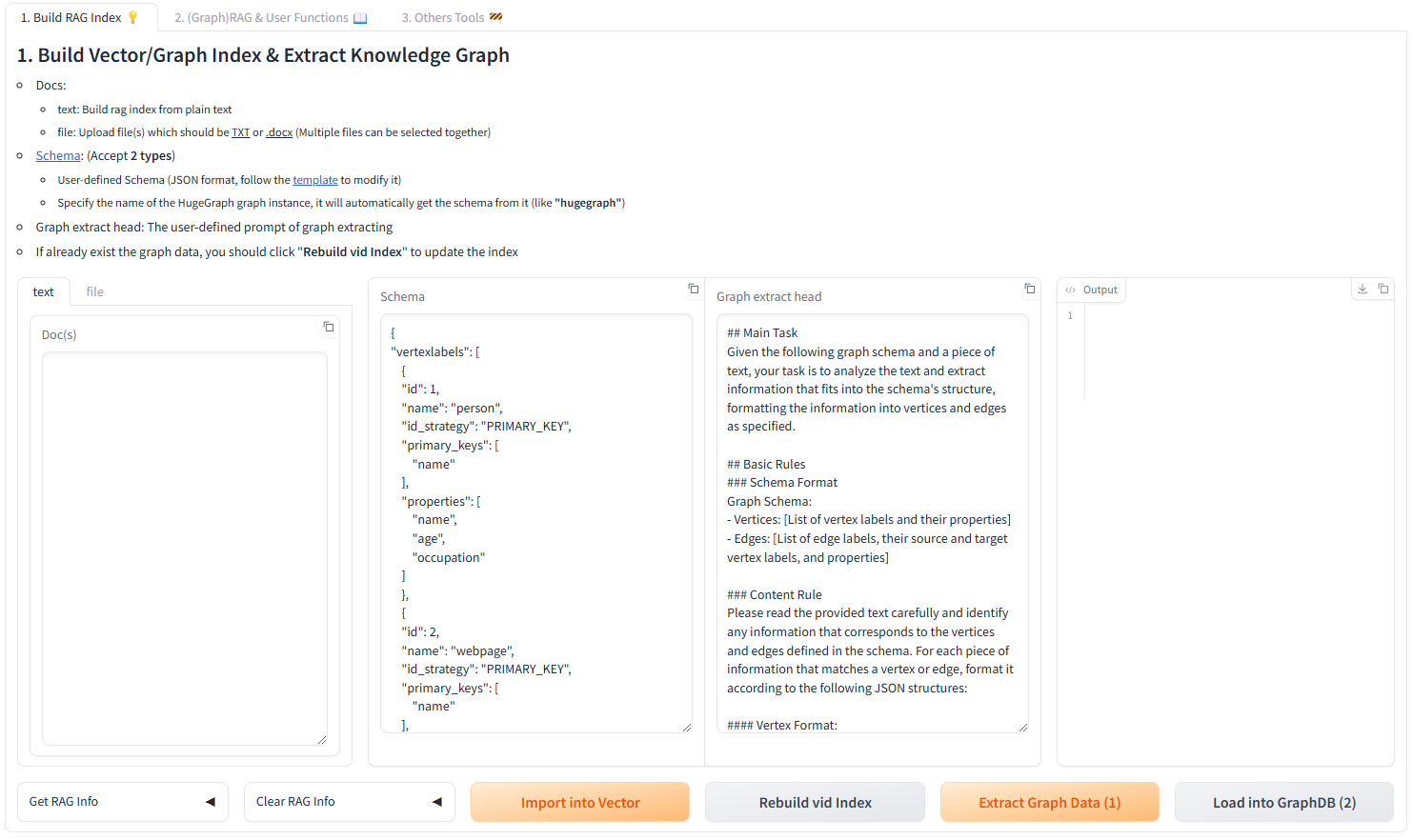
Interactive Web Interface
Use the Gradio interface for visual knowledge graph building:
Input Options:
- Text: Direct text input for RAG index creation
- Files: Upload TXT or DOCX files (multiple selection supported)
Schema Configuration:
- Custom Schema: JSON format following our template
- HugeGraph Schema: Use existing graph instance schema (e.g., "hugegraph")
🔧 Configuration
After running the demo, configuration files are automatically generated:
- Environment:
hugegraph-llm/.env - Prompts:
hugegraph-llm/src/hugegraph_llm/resources/demo/config_prompt.yaml
Language Support
The system supports both English and Chinese prompts. To switch languages:
- Edit
.envfile: ChangeLANGUAGE=entoLANGUAGE=CN(or vice versa) - Restart the application: The system will automatically regenerate prompts in the selected language
Supported Values:
LANGUAGE=EN- English prompts (default)LANGUAGE=CN- Chinese prompts (中文提示词)
Note
Configuration changes are automatically saved when using the web interface. For manual changes, simply refresh the page to load updates.
LLM Provider Support: This project uses LiteLLM for multi-provider LLM support.
Programmatic Examples (new workflow engine)
If you previously used high-level classes like RAGPipeline or KgBuilder, the project now exposes stable flows through the Scheduler API. Use SchedulerSingleton.get_instance().schedule_flow(...) to invoke workflows programmatically. Below are concise, working examples that match the new architecture.
- RAG (graph-only) query example
from hugegraph_llm.flows.scheduler import SchedulerSingleton

scheduler = SchedulerSingleton.get_instance()
res = scheduler.schedule_flow(
  "rag_graph_only",
  query="Tell me about Al Pacino.",
  graph_only_answer=True,
  vector_only_answer=False,
  raw_answer=False,
  gremlin_tmpl_num=-1,
  gremlin_prompt=None,
)

print(res.get("graph_only_answer"))
- RAG (vector-only) query example
from hugegraph_llm.flows.scheduler import SchedulerSingleton

scheduler = SchedulerSingleton.get_instance()
res = scheduler.schedule_flow(
  "rag_vector_only",
  query="Summarize the career of Ada Lovelace.",
  vector_only_answer=True,
  vector_search=True
)

print(res.get("vector_only_answer"))
- Text -> Gremlin (text2gremlin) example
from hugegraph_llm.flows.scheduler import SchedulerSingleton

scheduler = SchedulerSingleton.get_instance()
response = scheduler.schedule_flow(
  "text2gremlin",
  "find people who worked with Alan Turing",
  2,  # example_num
  "hugegraph",  # schema_input (graph name or schema)
  None,  # gremlin_prompt_input (optional)
  ["template_gremlin", "raw_gremlin"],
)

print(response.get("template_gremlin"))
- Build example index (used by text2gremlin examples)
from hugegraph_llm.flows.scheduler import SchedulerSingleton

examples = [{"id": "natural language query", "gremlin": "g.V().hasLabel('person').valueMap()"}]
res = SchedulerSingleton.get_instance().schedule_flow("build_examples_index", examples)
print(res)
Migration guide: RAGPipeline / KgBuilder → Scheduler flows
Why the change: the internal execution engine was refactored to a pipeline-based scheduler (GPipeline + GPipelineManager). The scheduler provides a stable entrypoint while keeping flow implementations modular.
If you need help migrating a specific snippet, open a PR or issue and include the old code — we can provide a targeted conversion.
🤖 Developer Guidelines
Important
> **For developers contributing to hugegraph-llm with AI coding assistance:**
- Start Here: First read
../rules/README.mdfor the complete AI-assisted development workflow- Module Context: Rename
AGENTS.mdin this directory as context for your LLM (e.g.,CLAUDE.md,copilot-instructions.md)- Code Analysis: Follow comprehensive analysis methodology in
../rules/prompts/project-deep.md- Documentation: Maintain structured documentation standards from
../rules/prompts/project-general.md- Quality Standards: Ensure type annotations, proper testing, and consistent patterns
- Business Logic: Focus on graph-LLM integration logic and RAG pipeline optimization
These guidelines ensure consistent code quality and maintainable graph-AI integrations.
📚 Additional Resources
- Graph Visualization: Use HugeGraph Hubble for data analysis and schema management
- API Documentation: Explore our REST API endpoints for integration
- Community: Join our discussions and contribute to the project
License: Apache License 2.0 | Community: Apache HugeGraph
Tag summary
Content type
Image
Digest
sha256:7d7d73092…
Size
317 MB
Last updated
3 months ago
docker pull hugegraph/ragThis week's pulls
Pulls:
74
Last week