k44sh/nginx
Docker of the NGINX web server based on Alpine Linux with PHP and a few modules
Image
Web servers
0
6.1K
k44sh/nginx repository overview







About
NGINX and PHP Docker image based on Alpine Linux.
Features
- Latest NGINX with latest PHP 8.3 from
Alpinerepository - GeoIP2 database by MaxMind (Update with your own key)
- s6-overlay process supervisor
- Run as non-root user
- Multi-platform image
Modules
| Module | Desctiption |
|---|---|
| nginx-mod-http-brotli | Serves compressed responses with brotli (Google) |
| nginx-mod-http-auth-jwt | Client authorization (JSON Web Token (JWT) / OpenID Connect) |
| nginx-mod-http-cookie-flag | Set the flags HttpOnly, secure and SameSite for cookies |
| nginx-mod-http-dav-ext | Additional implementation for full WebDav compatibility |
| nginx-mod-http-fancyindex | Like the built-in autoindex module, but fancier |
| nginx-mod-http-geoip2 | City and country code lookups via the MaxMind GeoIP2 |
| nginx-mod-http-headers-more | Set and clear input and output headers |
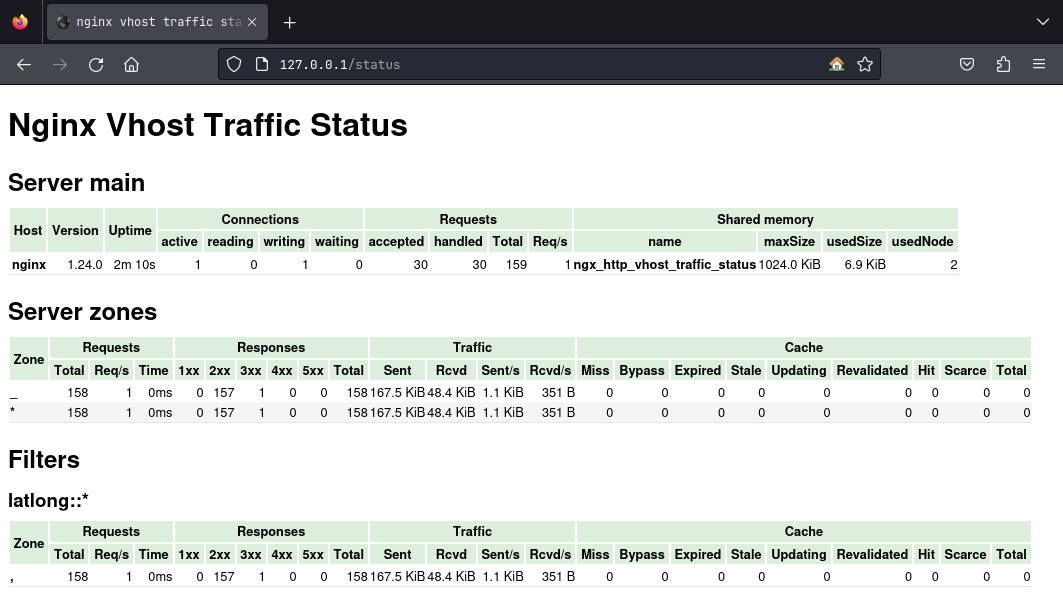
| nginx-mod-http-vts | Virtual host and upstream traffic status |
| nginx-mod-rtmp | RTMP protocol support. Live streaming and video on demand |
Example
VTS Module
Supported platforms
- linux/amd64
- linux/arm64
- linux/arm/v7
Usage
Docker Compose
Docker compose is the recommended way to run this image.
Edit the compose file with your preferences and run the following command:
git clone https://github.com/k44sh/nginx.git
mkdir -p {config,data}
docker-compose up -d
docker-compose logs -f
Upgrade
To upgrade, pull the newer image and launch the container:
docker-compose pull
docker-compose up -d
Command line
You can also use the following minimal command:
docker run --rm -d --name nginx \
  -p 80:8080/tcp \
  -p 1935:1935 \
  -e TZ="America/Toronto" \
  k44sh/nginx && \
  docker logs -f nginx
Or this one for more customization:
docker run --rm -d --name nginx \
  --ulimit nproc=65535 \
  --ulimit nofile=32000:40000 \
  --memory=2g \
  --cpus=4 \
  -p 80:8000/tcp \
  -p 1935:1935 \
  -e TZ="America/Toronto" \
  -e PORT="8000" \
  -e PUID="1002" \
  -e PGID="1002" \
  -e USER="docker" \
  -e MM_ACCOUNT="XXXXXX" \
  -e MM_LICENSE="xxxxxxxxxxxx" \
  -e MEMORY_LIMIT="1024M" \
  -e UPLOAD_MAX_SIZE="100M" \
  k44sh/nginx && \
  docker logs -f nginx
Environment Variables
| Variable | Description |
|---|---|
TZ | The timezone assigned to the container (default UTC) |
PORT | NGINX listening port (default 8080) |
PUID | NGINX user id (default 1000) |
PGID | NGINX group id (default 1000) |
USER | The user name assigned to the container (default docker) |
GEOIP2_CONF | Path to GeoIP2 configuration file (default /etc/geoip2.conf) |
GEOIP2_PATH | Path to the GeoIP2 data directory (default /geoip2) |
MM_ACCOUNT | Your MaxMind account ID |
MM_LICENSE | Your MaxMind license key |
MEMORY_LIMIT | PHP memory limit (default 512M) |
UPLOAD_MAX_SIZE | Upload max size (default 16M) |
CLEAR_ENV | Clear environment in FPM workers (default yes) |
OPCACHE_MEM_SIZE | PHP OpCache memory consumption (default 256) |
MAX_FILE_UPLOADS | The maximum number of files allowed to be uploaded simultaneously (default 50) |
RTMP (Streaming)
/var/www/stream/play.php: Internal authentication to add an authentication when publishing a stream/var/www/stream/publish.php: Internal authentication to add authentication to watch a stream
// Accounts
$accounts  =  array(
  0  =>  array(
    "name"  =>  "user1",
    "pass"  =>  "xxxxxxxxxxxxxxxx"
  ),
[...]
You can configure OBS like this:
- Server Example:
rtmp://192.168.1.1/stream - Key Example:
user1?name=user1&key=xxxxxxxxxxxxxxxxxxxxxxxxxxxxxxxxxxxxxxxx

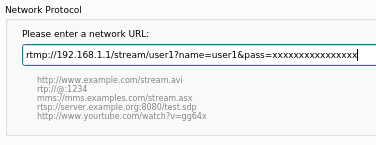
You can watch a stream like this:
- Network URL:
rtmp://192.168.1.1/stream/user1?name=user1&pass=xxxxxxxxxxxxxxxx
If you want remove authentication, just comment the following directives in nginx.conf:
on_publishhttp://127.0.0.1:8080/stream/publish.php;on_playhttp://127.0.0.1:8080/stream/play.php;
Documentation: https://github.com/arut/nginx-rtmp-module/wiki/Directives
Tag summary
Content type
Image
Digest
sha256:45fb175e6…
Size
134.3 MB
Last updated
24 days ago
docker pull k44sh/nginx