logentries/docker-logentries
The Docker Logentries Container is container that will collect per container log data and statistics
50M+
logentries/docker-logentries repository overview
Using InsightOps?
Please use our updated library which supports specifying the region to send your log data to.
docker-logentries
Forward all your logs to Logentries, like a breeze.
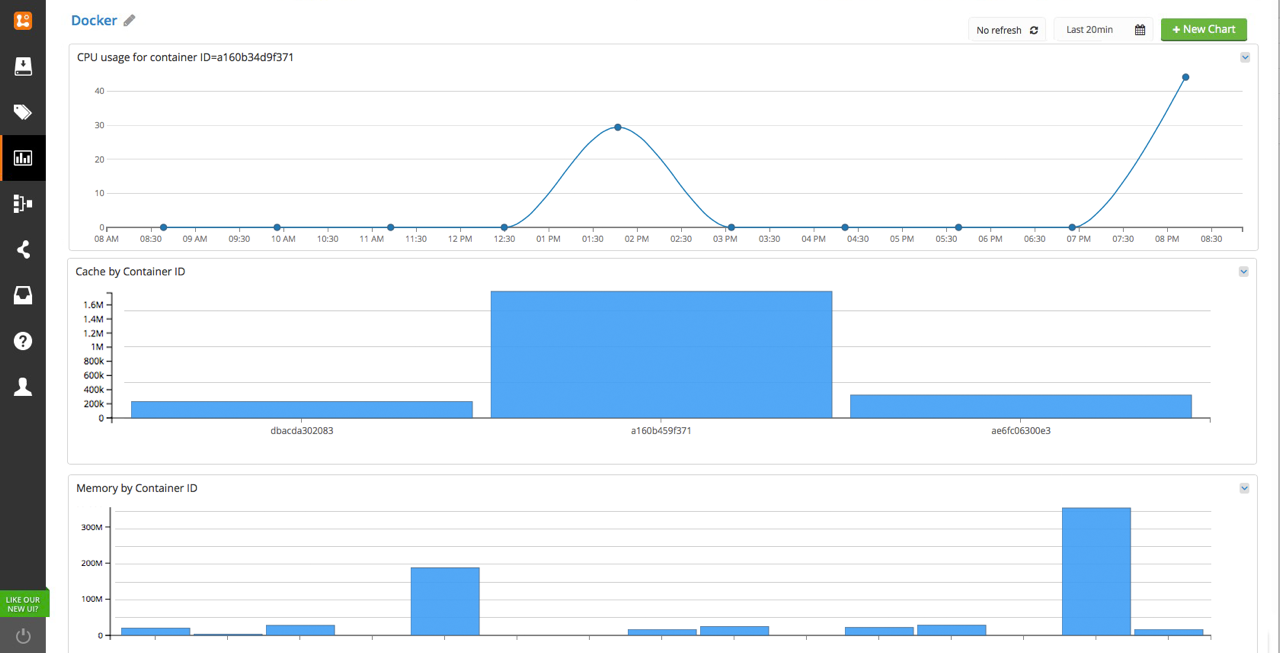
See the Logentries community pack at http://revelops.com/community/packs/docker/.
Usage as a Container
The simplest way to forward all your container's log to Logentries is to run this repository as a container, with:
docker run -v /var/run/docker.sock:/var/run/docker.sock \
           --read-only \
           --security-opt=no-new-privileges \
           logentries/docker-logentries \
           -t <TOKEN> \
           -j \
           -a host=`uname -n`
You can also use different tokens for logging, stats and events:
docker run -v /var/run/docker.sock:/var/run/docker.sock \
           --read-only \
           --security-opt=no-new-privileges \
           logentries/docker-logentries \
           -l <LOGSTOKEN> \
           -k <STATSTOKEN> \
           -e <EVENTSTOKEN> \
           -j \
           -a host=`uname -n`
The --read-only docker flag specifies that the container file system will be read-only.
This is not a requirement but since currently there's no need for writing, it makes the container more secure.
The --security-opt=no-new-privileges docker flag sets a kernel bit which stops the process or its children
from gaining additional privileges via setuid or sgid.
Once again not required, but increases security.
You can pass the --no-stats flag if you do not want stats to be
published to Logentries every second. You need this flag for Docker
version < 1.5.
You can pass the --no-logs flag if you do not want logs to be published to Logentries.
You can pass the --no-dockerEvents flag if you do not want events to be
published to Logentries.
The -i/--statsinterval <STATSINTERVAL> downsamples the logs sent to Logentries. It collects samples and averages them before sending to Logentries.
If you don't use -a a default host=`uname -n` value will be added.
You can also filter the containers for which the logs/stats are forwarded with:
--matchByName REGEXP: forward logs/stats only for the containers whose name matches the given REGEXP.--matchByImage REGEXP: forward logs/stats only for the containers whose image matches the given REGEXP.--skipByName REGEXP: do not forward logs/stats for the containers whose name matches the given REGEXP.--skipByImage REGEXP: do not forward logs/stats for the containers whose image matches the given REGEXP.
Running container in a restricted environment.
Some environments(such as Google Compute Engine) does not allow to access the docker socket without special privileges. You will get EACCES(Error: read EACCES) error if you try to run the container.
To run the container in such environments add --privileged to the docker run command.
Example:
docker run --privileged \
           -v /var/run/docker.sock:/var/run/docker.sock \
           --read-only \
           --security-opt=no-new-privileges \
           logentries/docker-logentries \
           -t <TOKEN> \
           -j \
           -a host=`uname -n`
Usage as a CLI
npm install docker-logentries -gdocker-logentries -t TOKEN -a host=\uname -n``- ..there is no step 3
You can also pass the -j switch if you log in JSON format, like
bunyan.
You can pass the --no-stats flag if you do not want stats to be
published to Logentries every second.
You can pass the --no-logs flag if you do not want logs to be published to Logentries.
You can pass the --no-dockerEvents flag if you do not want events to be
published to Logentries.
The -a/--add flag allows to add fixed values to the data being
published. This follows the format 'name=value'.
The -i/--statsinterval downsamples the logs sent to Logentries. It collects samples and averages them before sending to Logentries.
You can also filter the containers for which the logs/stats are forwarded with:
--matchByName REGEXP: forward logs/stats only for the containers whose name matches the given REGEXP.--matchByImage REGEXP: forward logs/stats only for the containers whose image matches the given REGEXP.--skipByName REGEXP: do not forward logs/stats for the containers whose name matches the given REGEXP.--skipByImage REGEXP: do not forward logs/stats for the containers whose image matches the given REGEXP.
Embedded usage
Install it with: npm install docker-logentries --save
Then, in your JS file:
var logentries = require('docker-logentries')({
  json: false, // or true to parse lines as JSON
  secure: true, // or false to connect over plain TCP
  token: process.env.TOKEN, // logentries TOKEN
  newline: true, // Split on newline delimited entries
  stats: true, // disable stats if false
  add: null, // an object whose properties will be added

  // the following options limit the containers being matched
  // so we can avoid catching logs for unwanted containers
  matchByName: /hello/, // optional
  matchByImage: /matteocollina/, //optional
  skipByName: /.*pasteur.*/, //optional
  skipByImage: /.*dockerfile.*/ //optional
})

// logentries is the source stream with all the
// log lines

setTimeout(function() {
  logentries.destroy()
}, 5000)
Building a docker repo from this repository
Using the plain docker file
First clone this repository, then:
docker build -t logentries .

docker run -v /var/run/docker.sock:/var/run/docker.sock \
           --read-only \
           --security-opt=no-new-privileges \
           logentries \
           -t <TOKEN> \
           -j \
           -a host=`uname -n`
Using Make - the official nodejs onbuild image
export BUILD_TYPE=node-onbuild
make build
make test
make tag
Using Make - the alpine linx build (~42Mb)
export BUILD_TYPE=alpine-node
make build
make test
make tag
Pushing to your own repo
After you've build, tested, tagged it locally
export DOCKER_REGISTRY_PREFIX=you-dockerhub-user/yourimage-name
make push
How it works
This module wraps four Docker APIs:
POST /containers/{id}/attach, to fetch the logsGET /containers/{id}/stats, to fetch the stats of the containerGET /containers/json, to detect the containers that are running when this module startsGET /events, to detect new containers that will start after the module has started
This module wraps docker-loghose and docker-stats to fetch the logs and the stats as a never ending stream of data.
All the originating requests are wrapped in a never-ending-stream.
Contact Support
Please email our support team at [email protected] if you need any help.
License
MIT
Tag summary
Content type
Image
Digest
sha256:cb07a6a58…
Size
242.4 MB
Last updated
almost 10 years ago
docker pull logentries/docker-logentries