sasanlabs/owasp-vulnerableapp
https://owasp.org/www-project-vulnerableapp/
50K+
sasanlabs/owasp-vulnerableapp repository overview
 OWASP VulnerableApp






Break it. Scan it. Reproduce it. Benchmark against it. Improve it.
OWASP VulnerableApp is a modular deliberately vulnerable application designed primarily for validating and benchmarking security scanners through reproducible test scenarios, while also supporting learning and experimentation.
🔍 What makes it different
Unlike traditional vulnerable applications, VulnerableApp is designed as a testable security ecosystem, not a static training app.
It enables:
- 🔬 Scanner benchmarking for tools like Burp Suite, OWASP ZAP, and custom DAST engines
- 🧩 Modular vulnerability design that allows new scenarios without modifying core services
- 📊 Security regression testing across releases and environments
- 🎯 Realistic attack surface simulation for modern web application patterns
- 🧪 Deterministic vulnerability behavior for repeatable scanning results
- 🧠 Built for security engineers, researchers, and educators
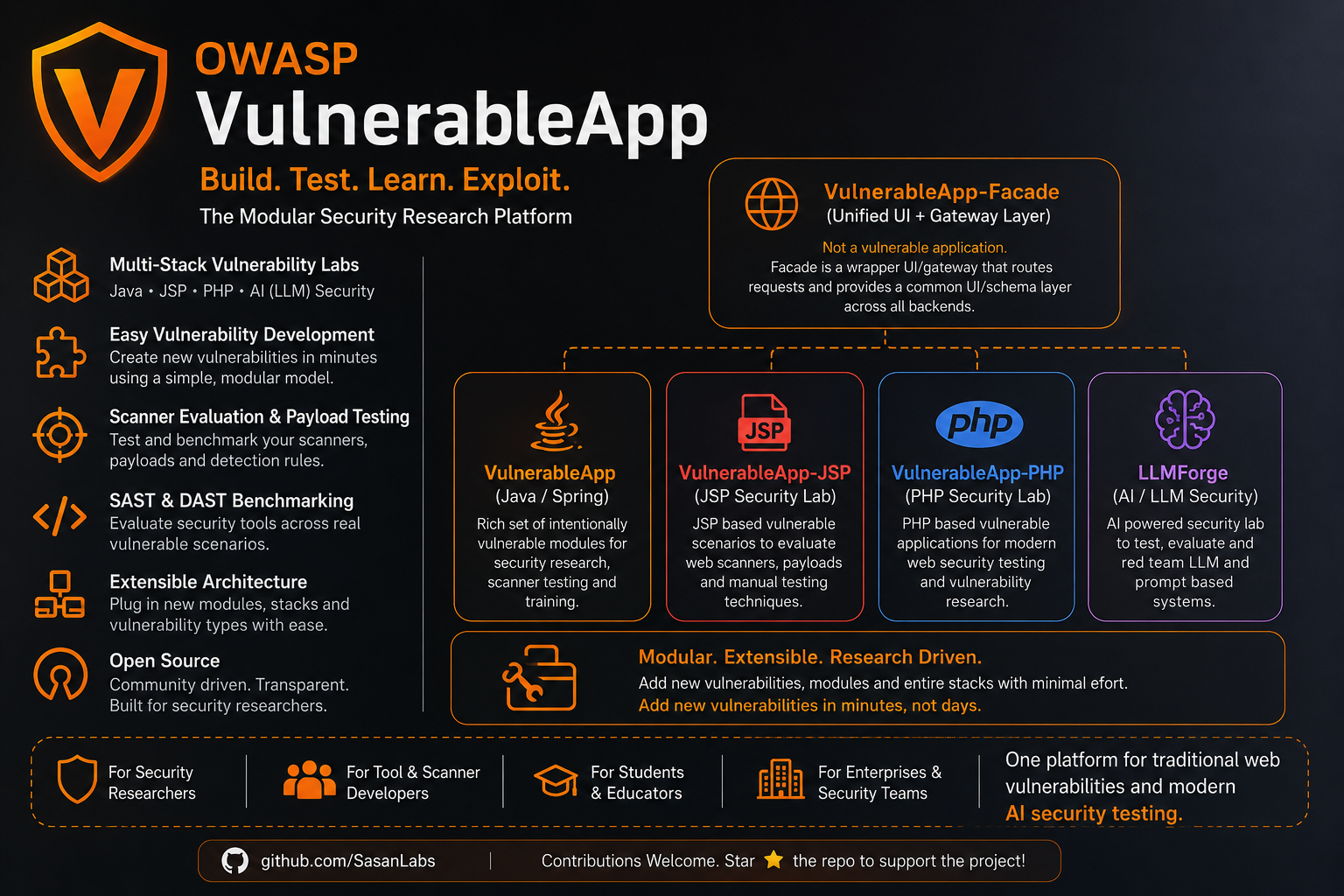
VulnerableApp helps you:
- Validate how security tools behave across known vulnerability patterns
- Build controlled environments for security experimentation
- Extend vulnerability coverage as new attack techniques emerge
- Run consistent, repeatable security testing pipelines
⚙️ Why it matters
Most vulnerable apps are:
- Static
- Hard to extend
- Designed only for manual learning
VulnerableApp is built for:
automation, reproducibility, and evolution
User Interface
Challenge Mode
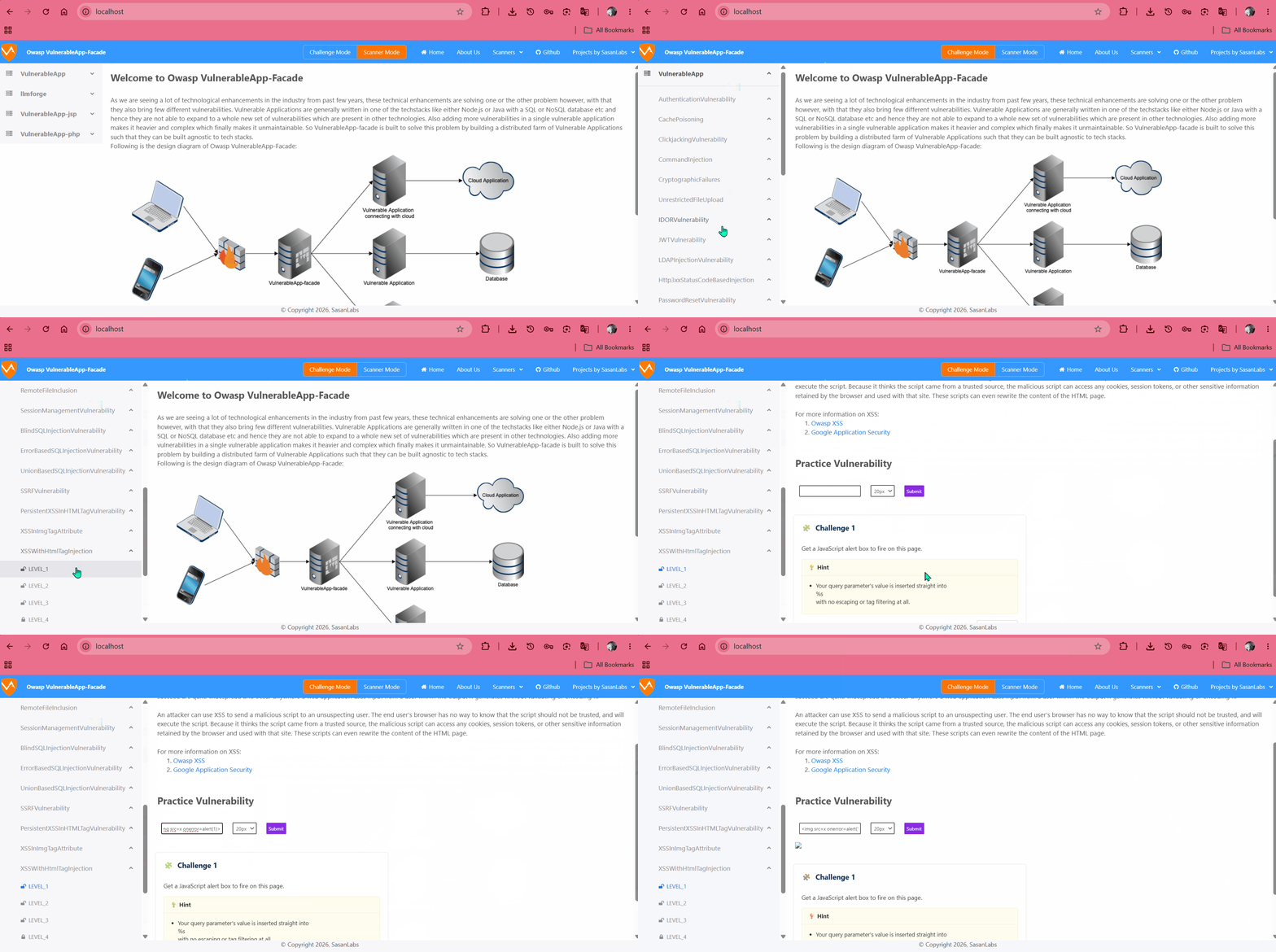
Switching Modes (Challenge & Scanner)
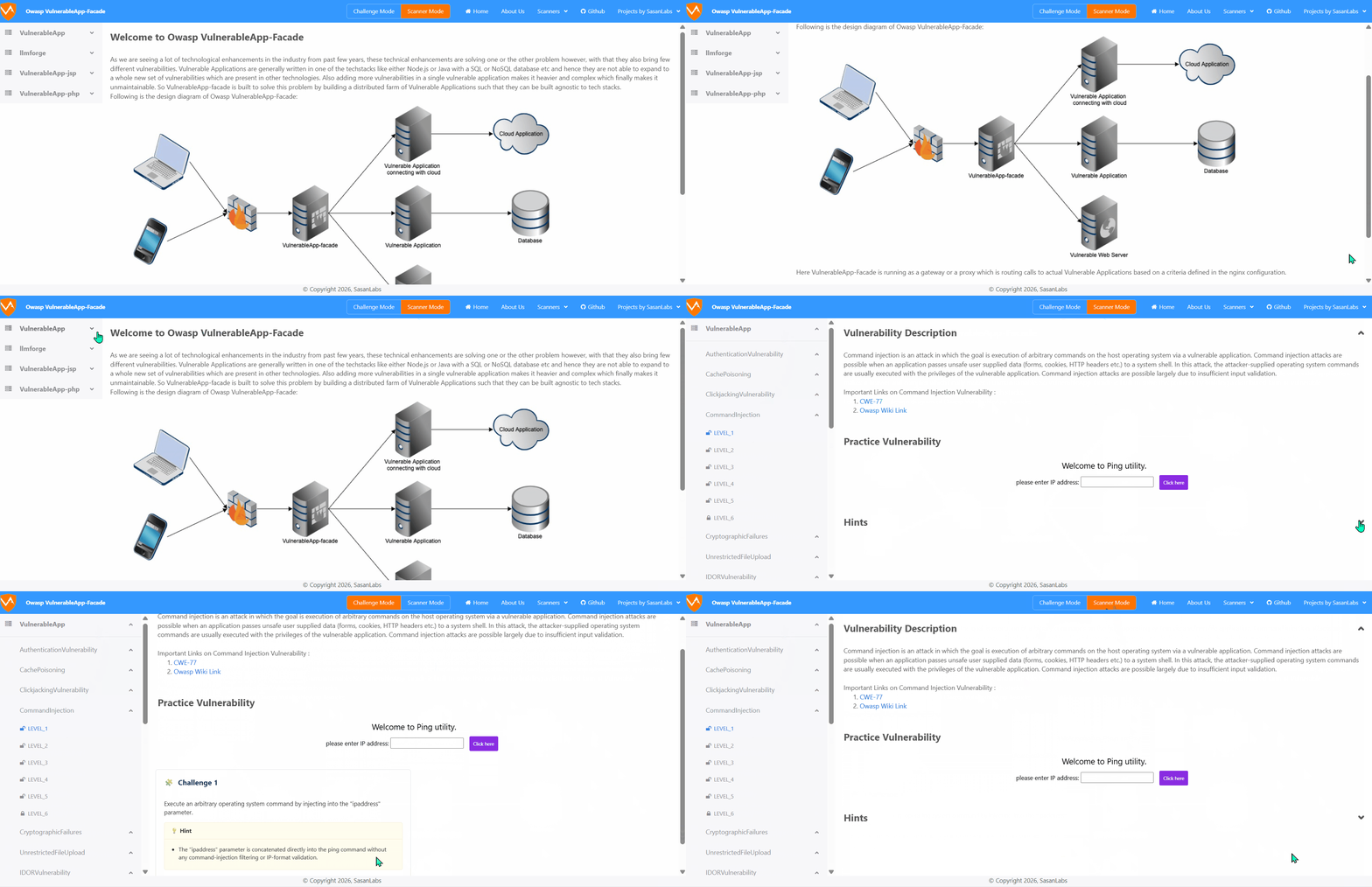
Scanner Mode Endpoints (DAST & SAST)
Scanner Mode Benchmark Comparator
Running the project
There are 2 ways to run the project:
- The simplest way to run the project is using Docker containers which will run the full-fleged VulnerableApplication with all the components. For running as Docker application, follow following steps:
- Download and Install Docker Compose
- Clone this Github repository
- Open the terminal and Navigate to the Project root directory
- Run the command
docker-compose pull && docker-compose up - Navigate to browser and visit
http://localhostand this will give the User Interface for VulnerableApp. - Mailpit is also available at
http://localhost/mailpit/for viewing emails captured by the local SMTP server.
- Another way to run the VulnerableApp is as standalone Vulnerable Application is:
- Navigate to Releases Section in github and download the Jar for the latest released version
- Open the terminal and navigate to the project root directory
- Run the command
java -jar VulnerableApp-* - Navigate to browser and visit
http://localhost:9090/VulnerableApp. This will give the Legacy User Interface for the VulnerableApp.
Building the project
There are 2 ways in which this project can be built and used:
- As a Docker application which will help in running the full-fledged VulnerableApplication. For running as Docker application, follow following steps:
- Build the docker image by running
./gradlew jibDockerBuild - Download Docker-Compose and run in the same directory
docker-compose up - Navigate to browser and visit
http://localhostand this will give the User Interface for VulnerableApp.
- Build the docker image by running
- As a SpringBoot application which will run with the Legacy UI or Rest API but gives the benefit of debugging and solving issues. This is the simple way,
- Import the project into your favorite IDE and run it
- Navigate to browser and visit:
http://localhost:9090/VulnerableAppand this will give the Legacy User Interface for VulnerableApp which you can use to debug and test.
Contributing to Project
There are multiple ways in which you can contribute to the project:
- If you are a developer and trying to start on to the project, then the suggestion is to go through the list of issues which contains
good first issuewhich can be a good starter. - If you are a developer or a security professional looking to add new Vulnerability type then you can Generate the Sample Vulnerability by running
./gradlew GenerateSampleVulnerability. It will generate the Sample Vulnerability template which has placeholders and comments. Modified files can be seen in the logs of the command or in the github history. You can navigate to those files, fill in the placeholders and then build the project to see the effect of the changes. - In case you are looking to contribute to the project by publicising it or working on the growth of the project, please feel free to add your thoughts to discussions section or issues and we can discuss over them.
Testing with Modern UI
VulnerableApp-facade provides a modern UI for VulnerableApp. To test your local changes with the Modern UI:
- Prerequisite: Ensure you have Docker and Docker-Compose installed.
- Run Testing Script:
- On Windows:
.\scripts\testWithModernUI.bat - On Linux/Mac:
./scripts/testWithModernUI.sh
- On Windows:
This script will build your local changes into a Docker image (sasanlabs/owasp-vulnerableapp:unreleased) and start the full stack (including facade, jsp, and php services) using docker-compose.local.yml.
-
Access the UI: Navigate to
http://localhostto see the modern UI with your changes. -
Access Mailpit: Navigate to
http://localhost/mailpit/to view emails captured by the local SMTP server.
Technologies used
- Java17
- Spring Boot
- ReactJS
- Javascript/TypeScript
Connecting to embedded H2 database
For accessing database from browser, visit: http://localhost:9090/VulnerableApp/h2
Database Connection properties:
JDBC Url: jdbc:h2:mem:testdb
User Name: admin
Password: hacker
Currently handled Vulnerability types
- JWT Vulnerability
- Command Injection
- Cryptography Failures
- File Upload Vulnerability
- Path Traversal Vulnerability
- SQL Injection
- XSS
- XXE
- Open Redirect
- SSRF
- IDOR
- Clickjacking
- LDAP Injection
- Authentication Vulnerability
- Password Reset Vulnerability
Benchmarking your scanner
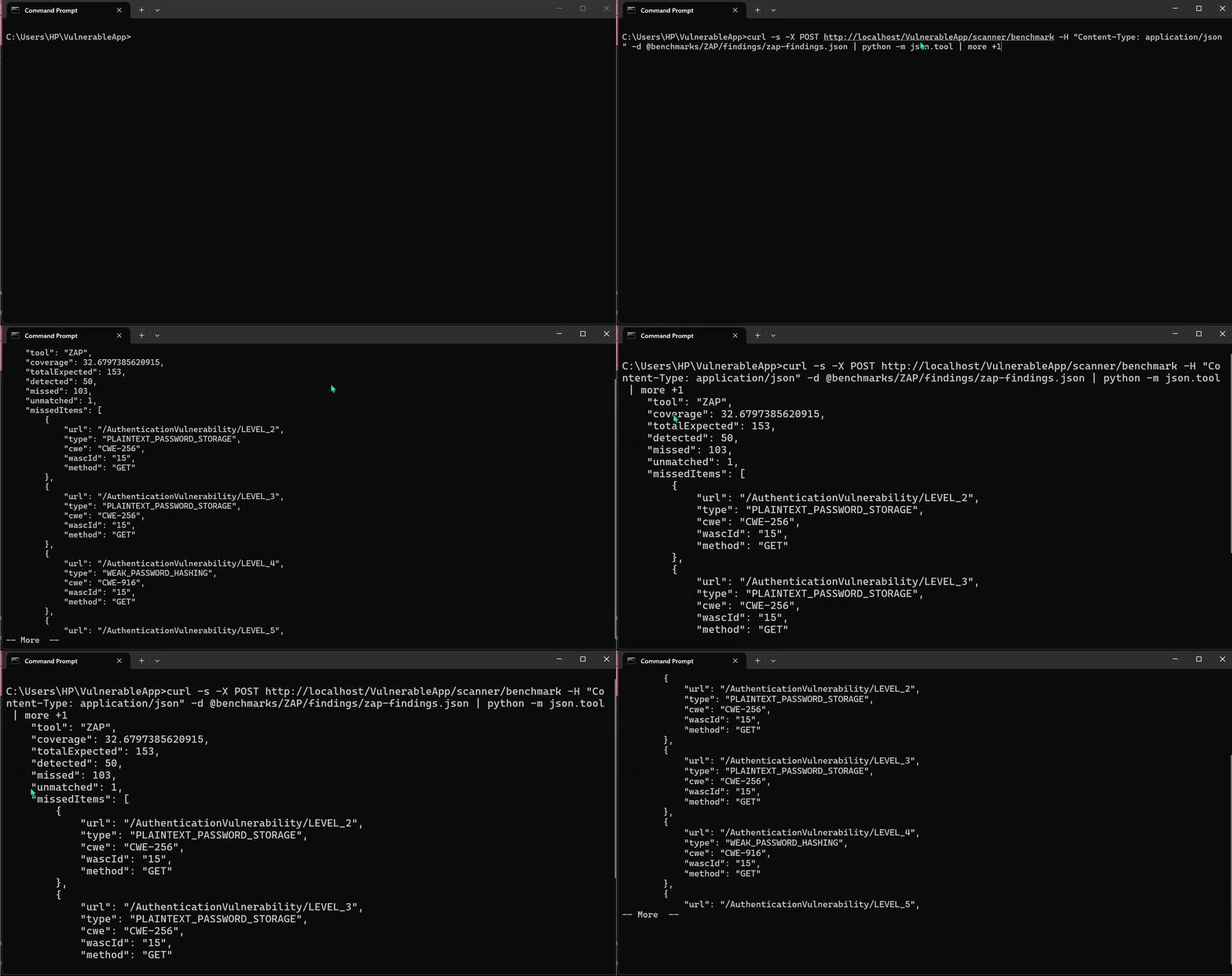
VulnerableApp ships a comparator that grades a scanner's findings against the project's built-in ground truth and writes a coverage / missed / unmatched report. Both DAST and SAST scanners are supported via the same endpoint:
- Endpoint:
POST http://<baseurl>/VulnerableApp/scanner/benchmark - Request body — pick the shape that matches your scanner:
- DAST:
{ tool, scanType: "DAST", findings: [ { url, type, cwe, wascId } ] }(scanTypeis optional and defaults toDAST;type/cwe/wascIdare individually optional — any one axis matching is enough) - SAST:
{ tool, scanType: "SAST", findings: [ { filePath, line, cwe, type } ] }
- DAST:
- Response body and
benchmarks/<tool>-results.jsonon disk: coverage report
Running the scanner itself is out of scope — you supply the JSON. See
benchmarks/README.md for the full input/output
schemas, matching rules, canonical vulnerability-type vocabulary, and curl
examples.
Contact
In case you are stuck with any of the steps or understanding anything related to project and its goals, feel free to shoot a mail at [email protected] or raise an issue and we will try our best to help you.
Documentation and References
- OWASP Spotlight series overview of project
- Overview video for OWASP Spotlight series
- Documentation
- Design Documentation
- Owasp VulnerableApp
- Overview Video
Blogs
- Overview of Owasp-VulnerableApp - Medium article
- Overview of Owasp-VulnerableApp - Blogspot post
- Introduction to Owasp VulnerableApp by Kenji Nakajima
- Gen AI based platform Shannon exploiting VulnerableApp
- I Built the OWASP ZAP File Upload Addon. Here’s Why VulnerableApp-Facade Had to Exist First
Usage of OWASP VulnerableApp
Troubleshooting references
Readme in other languages
Tag summary
Content type
Image
Digest
sha256:4d257dd24…
Size
159.6 MB
Last updated
about 2 hours ago
docker pull sasanlabs/owasp-vulnerableapp