sequenceiq/zedapp repository overview
I wish I get 1 dollar each time I install vi in a docker container ... I wanted an easier way to edit files in a running docker container. First of all try to avoid editing files at all, as it is against the container philosophy (see the last paragraph).
But if you have a valid reason, here comes the how-to.
Why Zedapp
Most of the time I use either vi or Atom, but a few months ago I stumbled upon Zedapp an opinionated editor. It aims to reduce cognitive load while editing, by simplifying things, like deliberately not using tabs.
It stands out with its first-class support of remote editing let it be a remote server, or even directly editing github repositories.
Zedapp just reached version 1.0 and if you like it, consider help Zef Hemmel at gratipay, who was brave enough to quit his regular job, and work full time on an open-source project!
Install Zedapp
You can use zedapp as a chrome plugin or a standalone app. Downloads are available at: zedapp.org. I recommend to go for the standalone version.
Install zedrem
For remote editing, you need zedrem, a small process serving files to be edited in Zedapp. Zedrem is packaged into a docker image: sequenceiq/zedapp
To start a local zed-server, and zed-client in the target container, there is a helper script: zed
To install the docker image and the shell script run this:
docker run --rm \
  -v /usr/local/bin:/target \
  -v /usr/local/bin/docker:/usr/local/bin/docker \
  -v /var/run/docker.sock:/var/run/docker.sock \
  sequenceiq/zedapp
Actually there is only a single binary called zedrem, i just use the
terminology: zed-server and zed-client to
distinguish when you use it with or without the --server option.
Now you are ready to start a zedrem session, to edit files in Zedapp which are inside of a Docker container's directory.
Start a zedrem session
To start a zedrem client in a container
zed <container> <directory>
This will:
- start a
zedrem-serverif not already running. - copy and start
zedrem-clientinto the selected container and print out the zedrem session's remote-url.
Navigate to the project list window by: Command-Shift-O/Ctrl-Shift-O. Select
Remote Folder, enter the remote-url into Zedrem URL input field and press
Open.
Thats all enyoj! All the following paragraphs are for the curious only.
Boot2docker helper function
The Install zedrem step should have detected that you are using Boot2docker,
and instructed you to create a helper function, but in case you missed it, or
for reference:
zed() { boot2docker ssh "sudo zed $@" ; }
This is needed as the helper script called zed is installed inside of
Boot2docker, so you need the ususal boot2docker ssh workaround.
after that you can issue directly on OSX:
zed <container> <directory>
Local zedrem server.
By default when you want to use Zedapp for remote editing, you need two other components then Zedapp:
- zedrem-server Zedapp gets file content, and sends edit commands on webservices protocol. It maintains sessions with zedrem-clients.
- zedrem-client a small process serving files from a specified directory.
When you use zedrem-client via the official server, all the editing commands/content travel around the blobe:
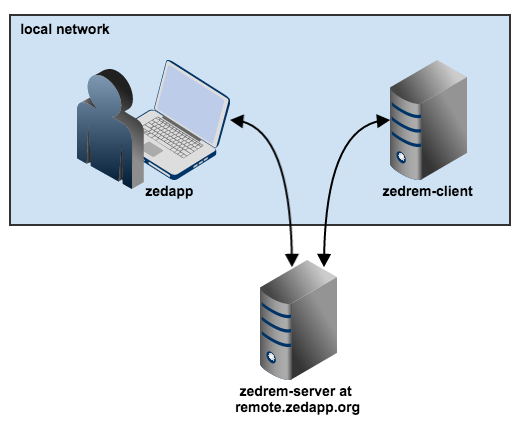
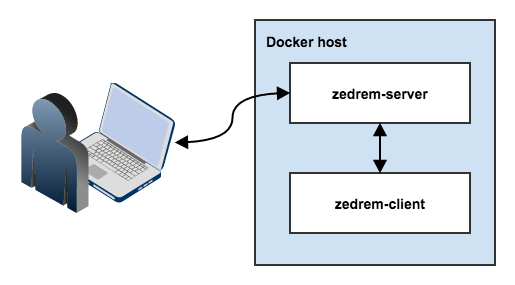
Compare it with the dockerized local server setup, which is more quick and
secure:
nsenter
You might wonder about the step: copy zedrem into the container. How is it
possible? Docker's cp command only supportts the other direction: copy from a
container into a local dir.
There is an open issue, so it
will be fixed soon, but meanwhile you can use nsenter to the rescue. Jérôme
Petazzoni prepared us a canned nsenter
with the helper script: docker-enter. We can missuse docker-enter to copy
a file from local fs into the container by:
cat local-file | docker-enter $container sh -c 'cat>/zedrem'
btw: docker exec is already merged into the master branch, so it will replace
nsenter completely.
Don't do this at all
Let's make it clear, that most of the time you don't need this. First of all editing files in a container, other than development or debug considered bad practice.
You find yourself editing nginx config files? Don't do it, use the great generic nginx appliance from Jeff Lindsay.
If you really need to edit files in a docker container, just use volumes.
This process comes handy if you've already started a container, and the file in question doesn't sits on a volume.
Tag summary
Content type
Image
Digest
sha256:3258fd7a4…
Size
149.9 MB
Last updated
over 10 years ago
docker pull sequenceiq/zedapp