sflow/sflow-rt
Real-time network, server and application analytics using sFlow-RT
100K+
sflow/sflow-rt repository overview
What is sFlow-RT?
sFlow-RT receives a continuous stream of telemetry from standard sFlow agents embedded in network devices, hosts and applications and converts them into actionable metrics, accessible through a REST API.
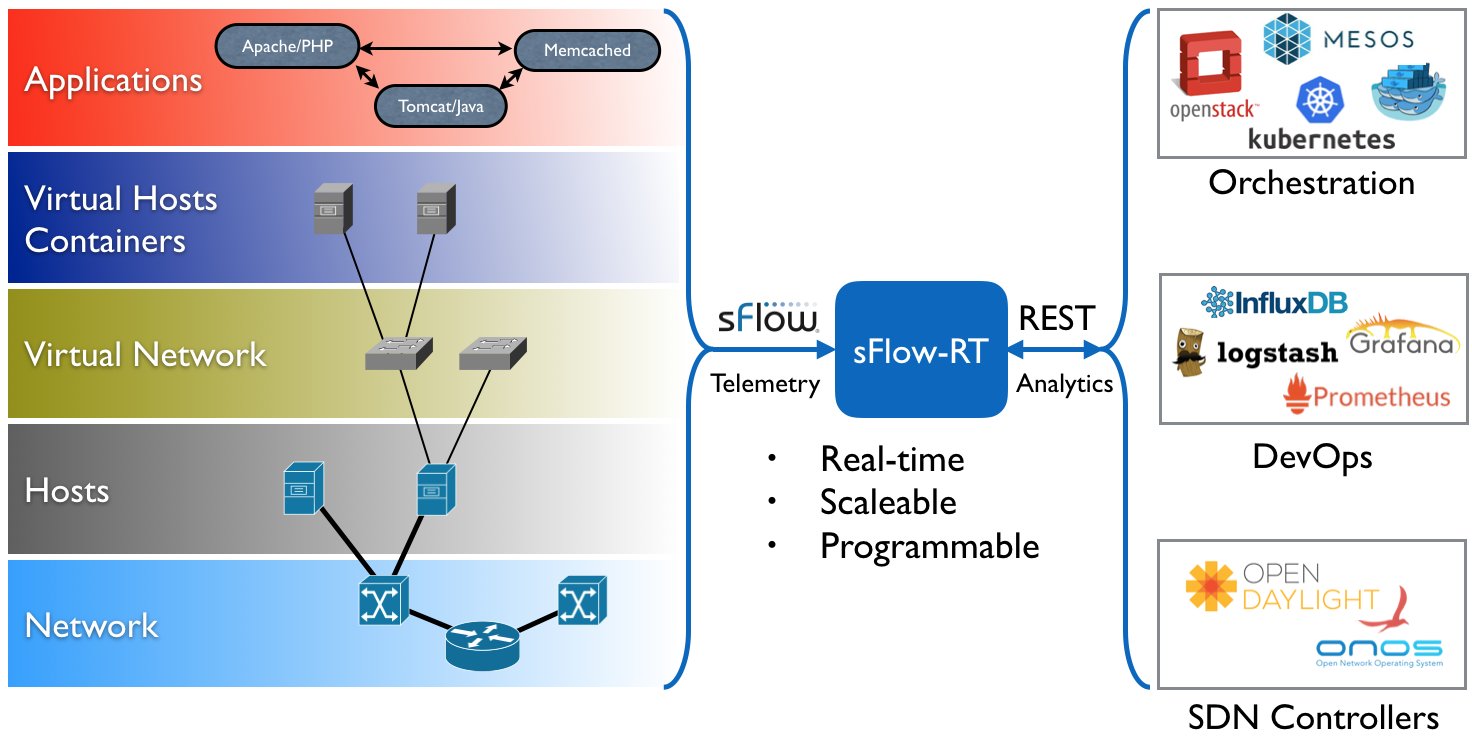 Metrics can easily be integrated with a wide variety of on-site and cloud, orchestration, DevOps and Software Defined Networking (SDN) tools.
Packages based on this image
The following packages are based on this image:
- sflow/prometheus This image is a good starting point for exploring sFlow data, included applications for real-time browsing of metrics, packet flows, packet drops, and metric export in Prometheus scrape format.
- sflow/ddos-protect This image provides a DDoS mitigation solution, detecting and mitigating volumetric attacks.
- sflow/topology This image contains tools for monitoring leaf and spine data center fabrics.
- sflow/ai-metrics This image provides real-time metrics for AI / ML RoCEv2 clusters.
- sflow/ixp-metrics This image provides real-time metrics for an Internet Exchange Provider (IXP), including member-to-member traffic matrix.
- sflow/sflow-test This image contains tools to test complaince and accuracy of sFlow agents.
How to use this image
docker run --rm -p 8008:8008 -p 6343:6343/udp sflow/sflow-rt
Configure sFlow agents to send data to UDP port 6343 on the container. Access the HTTP/REST API on port 8008.
docker run --rm -e "RTMEM=2G" -p 8008:8008 -p 6343:6343/udp sflow/sflow-rt
Increase memory from default 1G to 2G. See Tuning Performance for configuration suggestions for large scale monitoring.
docker run --rm -p 8008:8008 -p 6343:6343/udp sflow/sflow-rt -Dgeo.country=resources/config/GeoLite2-Country.mmdb
Set System Property to enable country lookups when Defining Flows.
docker run --rm -p 8008:8008 -p 6343:6343/udp -v $PWD/script.js:/script.js sflow/sflow-rt -Dscript.file=/script.js
Run JavaScript on startup. Useful for initializing flows, groups, maps, BGP sessions, and topology.
docker run --rm -v $PWD/my-app:/sflow-rt/app/my-app -p 8008:8008 -p 6343:6343/udp sflow/sflow-rt
Run sFlow-RT Application. Drop the -d option while developing an application to see output of logging commands and use control-c to stop the container.
FROM sflow/sflow-rt:latest
COPY /Users/pp/my-app /sflow-rt/app
A simple Dockerfile can be used to generate a new image that includes the application.
FROM sflow/sflow-rt:latest
ENV RTAPP="-Dgeo.ipinfo=resources/config/ipinfo_lite.mmdb"
RUN /sflow-rt/get-app.sh sflow-rt browse-flows
Similarly, a Dockerfile can be used to generate a new image from published applications. Any required System Properties can also be set in the Dockerfile. Using the RTAPP environment variable for application specific properties allows the user to set additional properties using the RTPROP variable.
docker run --rm -v $PWD:/sflow-rt/app --entrypoint /sflow-rt/get-app.sh --user $(id -u):$(id -g) sflow/sflow-rt sflow-rt browse-flows
Download published application to current directory. The --user $(id -u):$(id -g) option is needed to allow container to write to local file system as local user.
docker run --rm -v $PWD:/sflow-rt/app --entrypoint /sflow-rt/get-app.sh --user $(id -u):$(id -g) sflow/sflow-rt sflow-rt browse-flows
docker run --rm -v $PWD:/sflow-rt/app --entrypoint /sflow-rt/get-app.sh --user $(id -u):$(id -g) sflow/sflow-rt sflow-rt browse-metrics
docker run --rm -v $PWD:/sflow-rt/app -p 6343:6343/udp -p 8008:8008 sflow/sflow-rt
Install browse-metrics and browse-flows applications and start sFlow-RT. These applications are a useful way to explore metrics and traffic flows available from the sFlow telemetry stream.
dns.servers=resolv.conf
geo.ipinfo=resources/config/ipinfo_lite.mmdb
oui.names=resources/config/oui.txt
flow-trend.maxFlows=20
flow-trend.aggMode=sum
If a large number of System Property and application property values need to be set, then first define a configuration file, for example the local.conf file above.
docker run --rm -v $PWD/local.conf:/sflow-rt/local.conf -v $PWD/app:/sflow-rt/app \
-p 6343:6343/udp -p 8008:8008 sflow/sflow-rt -Dsystem.propertyFiles=local.conf
Run sFlow-RT with the configuration settings.
docker run --rm -v $PWD/local.conf:/sflow-rt/local.conf -v $PWD/app:/sflow-rt/app \
-v $PWD/store:/sflow-rt/store -p 6343:6343/udp -p 8008:8008 --user $(id -u):$(id -g) sflow/sflow-rt \
-Dsystem.propertyFiles=local.conf
The /sflow-rt/store directory is used by some applications to store state. Use a local volume if you want application settings to persist between restarts.
Environment variables
RTMEMSet memory allocation for Java heap, default1GRTGCSet Java garbage collector settings, default-XX:+UseZGC -XX:+UseCompactObjectHeaders -XX:+ExitOnOutOfMemoryErrorRTPROPUser defined system propertiesRTAPPSet system properties in a Dockerfile
Documentation and support
Visit sFlow-RT for documentation, tutorials, and community support.
License
Please read and accept the License Agreement before downloading this software.
Tag summary
Content type
Image
Digest
sha256:a095c72f3…
Size
50.8 MB
Last updated
20 days ago
docker pull sflow/sflow-rt