smeagolworms4/googlefindmytools
Framework for tracking and building your own Google Find My Device / Find Hub trackers 🧭
3.4K
smeagolworms4/googlefindmytools repository overview
GoogleFindMyTools
This repository includes some useful tools that reimplement parts of Google's Find My Device Network (now called Find Hub Network). Note that the code of this repo is still very experimental.
What's possible?
Currently, it is possible to query Find My Device / Find Hub trackers and Android devices, read out their E2EE keys, and decrypt encrypted locations sent from the Find My Device / Find Hub network. You can also send register your own ESP32- or Zephyr-based trackers, as described below.
Docker Web integration
This fork is a fully web-based integration of the Python script. It includes a no-VNC service for connecting with Google Chrome.
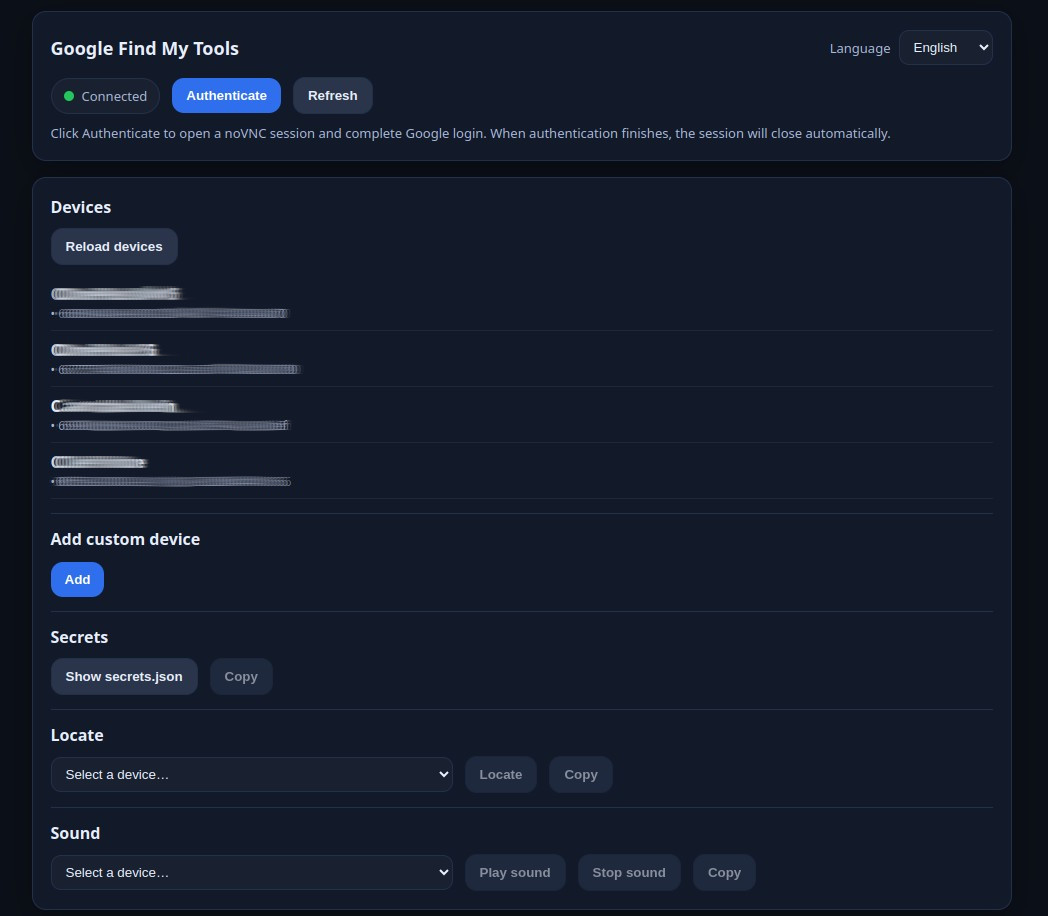
To launch the container:
docker run --rm -it -p 8000:8000 -v "$(pwd)/data":/data smeagolworms4/googlefindmytools:latest
After opening http://127.0.0.1:8000/
Use in Home assistant Addon : https://github.com/GollumDom/addon-repository
Docker hub: https://hub.docker.com/r/smeagolworms4/googlefindmytools
How to use
Caution
Before starting, ensure you have Chrome and Python updated.If Chrome is not up to date, the script will NOT work, guaranteed!
- Clone this repository:
git cloneor download the ZIP file - Change into the directory:
cd GoogleFindMyTools - Optional: Create venv:
python -m venv venv - Optional: Activate venv:
venv\Scripts\activate(Windows) orsource venv/bin/activate(Linux & macOS) - Install all required packages:
pip install -r requirements.txt - Install the latest version of Google Chrome: https://www.google.com/chrome/
- Start the program by running main.py:
python main.pyorpython3 main.py
Authentication
On the first run, an authentication sequence is executed, which requires a computer with access to Google Chrome.
The authentication results are stored in Auth/secrets.json. If you intend to run this tool on a headless machine, you can just copy this file to avoid having to use Chrome.
Known Issues
- "Your encryption data is locked on your device" is shown if you have never set up Find My Device on an Android device. Solution: Login with your Google Account on an Android device, go to Settings > Google > All Services > Find My Device > Find your offline devices > enable "With network in all areas" or "With network in high-traffic areas only". If "Find your offline devices" is not shown in Settings, you will need to download the Find My Device app from Google's Play Store, and pair a real Find My Device tracker with your device to force-enable the Find My Device network.
- No support for trackers using the P-256 curve and 32-Byte advertisements. Regular trackers don't seem to use this curve at all - I can only confirm that it is used with Sony's WH1000XM5 headphones.
- No support for the authentication process on ARM Linux
- If you receive "ssl.SSLCertVerificationError" when running the script, try to follow this answer.
- Please also consider the issues listed in the README in the ESP32Firmware folder if you want to register custom trackers.
Firmware for custom ESP32-based trackers
If you want to use an ESP32 as a custom Find My Device tracker, you can find the firmware in the folder ESP32Firmware. To register a new tracker, run main.py and press 'r' if you are asked to. Afterward, follow the instructions on-screen.
For more information, check the README in the ESP32Firmware folder.
Firmware for custom Zephyr-based trackers
If you want to use a Zephyr-supported BLE device (e.g. nRF51/52) as a custom Find My Device tracker, you can find the firmware in the folder ZephyrFirmware. To register a new tracker, run main.py and press 'r' if you are asked to. Afterward, follow the instructions on-screen.
For more information, check the README in the ZephyrFirmware folder.
iOS App
You can also use my iOS App to access your Find My Device trackers on the go.
Tag summary
Content type
Image
Digest
sha256:533c6dbf6…
Size
475.7 MB
Last updated
8 months ago
docker pull smeagolworms4/googlefindmytools